The Basics


|
The Basics |
|
|
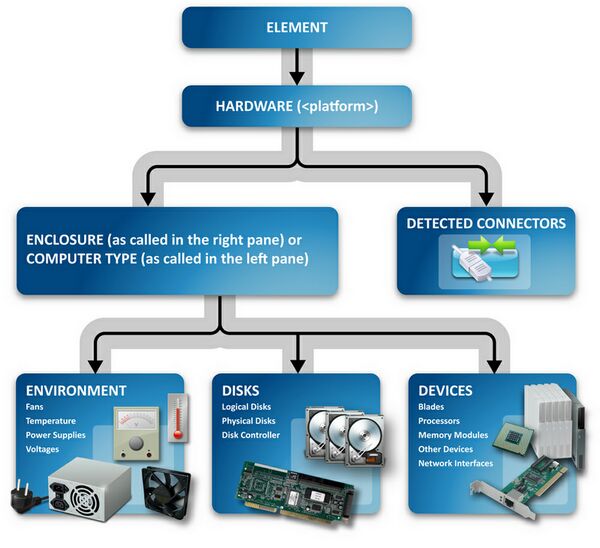
BPM Express for Hardware requires no configuration to discover and monitor the hardware components within your BMC© Performance Manager Portal environment. Once the PM is installed after ensuring that all prerequisites have been as described in the Installation Guide (such as installing the manufacturer-specific hardware agents etc.), and the class is added to an element or Element Profile, an icon labeled Hardware (<platform>) appears in the Portal interface and the PM discovers all the hardware components of the managed element. The discovered hardware components of the monitoring element are grouped under certain container icons. Here is a the structure of how the monitored elements are displayed in the Portal interface:
Hardware Components Structure In the left pane of the Status tab, the hardware component icons are shortened as follows: Environment ●Battery ●Fans - FAN ●Power Supply - PS ●Temperature - TEMP ●Voltage - VOLT Disks ●Disk Controller - CTRL ●LUN ●Logical disk - LD ●Physical disk - HD ●Tape Drive Devices ●Blade - BL ●Enclosure ●Fiber Channel - FC ●LED ●Memory Module - MEM ●Network Interface - NET ●Other Device - name of the actual "other device" as reported by the underlying instrumentation agent ●Processors - CPU ●Robotics ●System Chassis BPM Express for Hardware sets thresholds by default on all parameters, but you can modify the thresholds as per your specific requirements.
|