Configure Java Settings


Configure Java Settings |
|
|
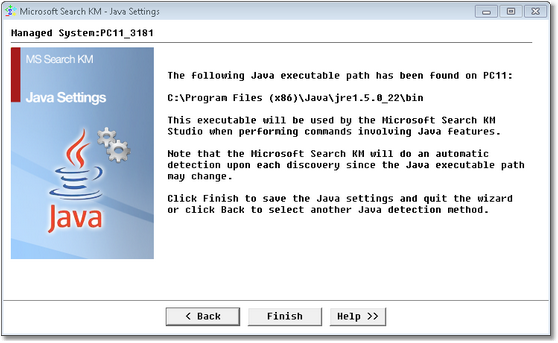
The Java Settings wizard enables you to define which Java instance is to be used by Microsoft Search KM for PATROL for managing the E-mail alert action only when using the version 3.6.0.11 (or older) of PATROL agent. To access the Java Settings wizard, right-click the main Microsoft Search instance > KM commands > KM Settings > Java Settings. Select the Java executable detection method: Select one of the three following options: •Let the KM automatically detect the Java path: Select this option if you wish Microsoft Search KM for PATROL to detect the Java executable directory by itself upon each discovery. •Select a Java path detected by Microsoft Search KM: Select this option if you wish to select a Java executable directory within a list of pre-detected executables. •Enter manually the Java path to be used by Microsoft Search KM: Select this option if you wish to manually enter the Java executable directory path. Click Next to continue. Automatic DetectionIf you have selected the automatic detection at the previous step of the wizard, Microsoft Search KM for PATROL displays the path of the Java executable directory that will be used when performing commands requiring Java features.
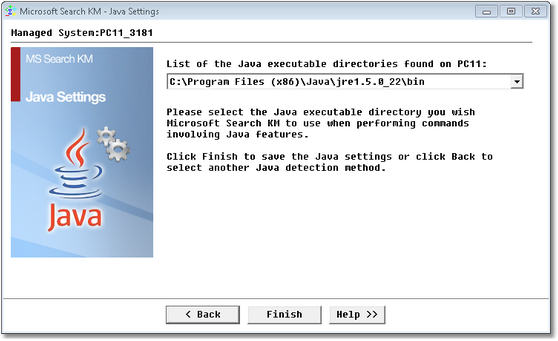
Java Settings Wizard — Automatic Detection Click Finish to save your settings. User SelectionIf you have selected the user selection option at the previous step of the wizard, Microsoft Search KM for PATROL displays a list of all the Java executable directory found on your machine.
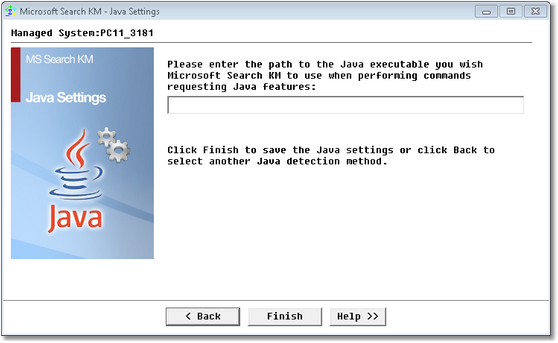
Java Settings Wizard — User Selection Select the Java executable directory you wish Microsoft Search KM for PATROL to use when performing commands requiring Java features and click Finish to save your settings. Manual
Java Settings Wizard — Manual Settings If you have selected the Manual option at the previous step of the wizard, Microsoft Search KM for PATROL let you enter the path to the Java executable directory you wish the application to use when performing commands requiring Java features. Click Finish to save your settings. |