Threshold Mechanism Selection


Threshold Mechanism Selection |
|
|
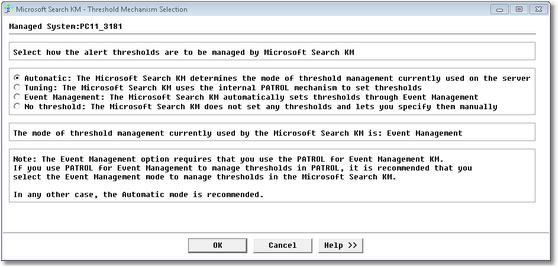
Managing thresholds means selecting/modifying the mechanism by which Microsoft Search KM for PATROL sets thresholds for all parameters of the monitored components. This is done through the menu command: KM Settings > Threshold Mechanism Selection. By default, Microsoft Search KM for PATROL automatically sets alert thresholds on the monitored parameters. The different threshold mechanismsTo set the thresholds, Microsoft Search KM for PATROL uses one of the following two mechanisms, best suited to the managed system: •Tuning: A standard internal PATROL mechanism, known as the Override parameters in PATROL but called Tuning in Microsoft Search KM for PATROL. With this mechanism, Microsoft Search KM for PATROL sets the thresholds of each parameter of each monitored object by setting a specially formatted variable under the /___tuning___ tree in the PATROL Agent configuration. Or •Event Management: PATROL for Event Management (formerly known as EventSpring) By default, Microsoft Search KM for PATROL determines which of the above two mechanisms is best suited to the managed system and uses that. This is the Automatic setting in the Threshold Mechanism Selection wizard. To see which mode is currently used for the system, or to modify the Automatic mechanism, right-click: the main Microsoft Search KM instance > KM Commands > KM Settings > Threshold Mechanism Selection...
Threshold Mechanism Selection Select one of the following options: •Automatic (default): Microsoft Search KM for PATROL determines and uses the threshold mechanism best suited to the managed system •Tuning: If selected, Microsoft Search KM for PATROL will manage its thresholds through the standard the internal PATROL mechanism (Override parameters). Thresholds are stored in the PATROL Agent configuration under the /___tuning___ tree. •Event Management: If this option is selected, Microsoft Search KM for PATROL will manage its thresholds through the Event Management mechanism. Thresholds are stored in the PATROL Agent configuration under the /AS tree. This option requires that you set up the PATROL for Event Management KM on your PATROL Agent. PATROL for Event Management has to be enabled and preloaded.
•No Thresholds: Microsoft Search KM for PATROL will not set any thresholds on the monitored objects. You are required to set them manually. For details on how to manually set thresholds on the parameters, please see the topic: Modify Alert Thresholds. |