|
Whenever relevant, BMC Performance Manager Express for NetApp Filers automatically sets thresholds for parameters. If you prefer a more fault-tolerant monitoring, you can modify the thresholds of each parameter through the Configure tab > Edit Thresholds.
| 1. | In the Configure tab, click: |
| • | Storage (<platform>) icon > Thresholds, Properties and Credentials > Edit to modify the parameter thresholds of several storage objects of an element |
| • | Instance icon > Thresholds, Properties and Credentials > Edit to modify the thresholds of a particular instance |
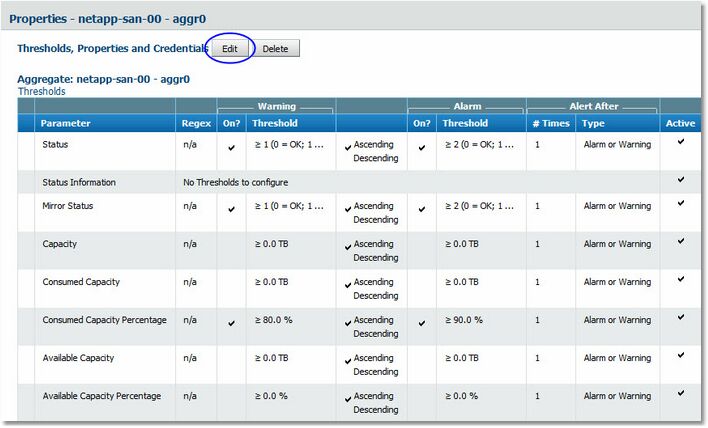
Thresholds, Properties and Credentials
 Any modification to the thresholds or any other properties of elements created using the "Element Profile" mode is to be done using the Element Profile route or by clicking "Override Profile" Any modification to the thresholds or any other properties of elements created using the "Element Profile" mode is to be done using the Element Profile route or by clicking "Override Profile"
| 2. | Disable the alert conditions in the Status parameter, i.e. un-check the boxes for Warning and Alarm. |
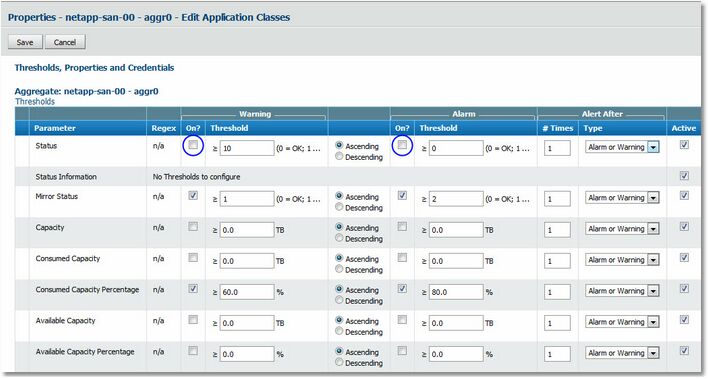
Disabling the default alert thresholds on Status
Disable the alerts on the Status parameter by un-checking the boxes
| 3. | Enable the alert conditions on the parameter by checking the boxes, and manually enter the threshold values and then click Save. |
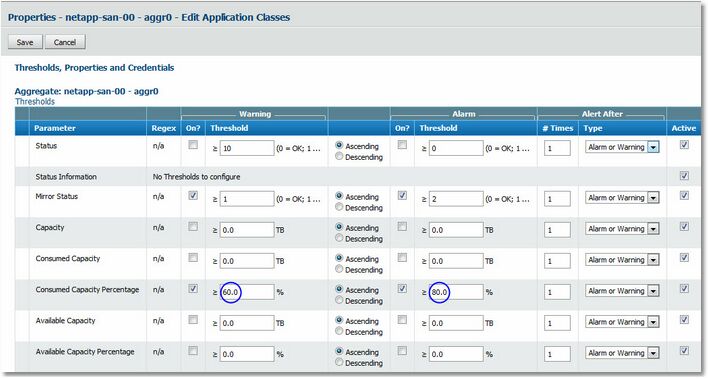
Modifying threshold values
Manually modify the thresholds on the parameter and activate the alerts
| 4. | The Success, changes have been saved message indicates that the modifications have been registered. |
Alerts are displayed by the parameter whose thresholds are modified.
| 

