| 1. | Login to the Portal with normal user credentials. |
| 2. | Click Configure tab > Element Profiles. The Available Profiles page appears. Select the Profile to which you wish to add the Application Servers class > Edit. |
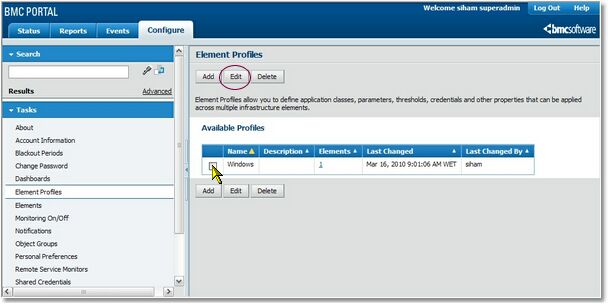
Selecting a Profile
| 3. | The selected Element Profile’s Properties page appears. Go to Application Classes > Add. |
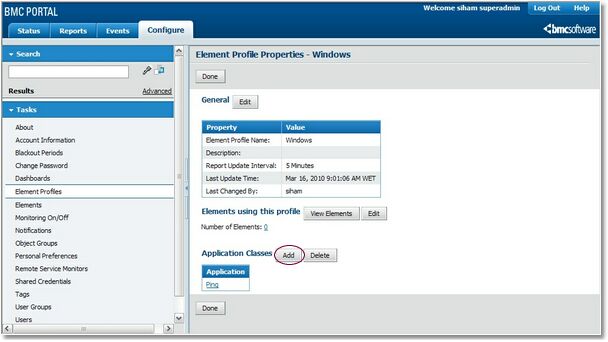
Adding Application Classes
| 4. | The Element Profile Properties – Add Application Classes page appears. Choose Application Servers from the Select Category drop-down list. |
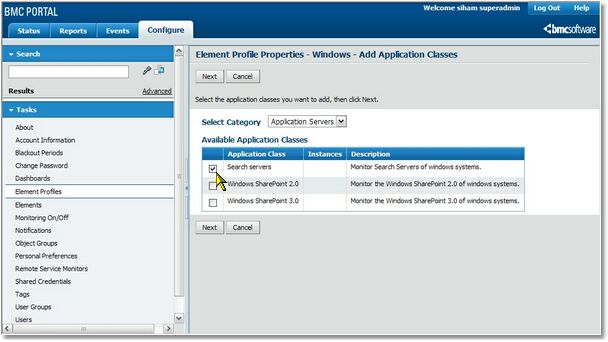
Selecting the Storage Applicable Class
| 5. | When selecting the category "Application Servers" from the drop down list, all the different Microsoft Search application classes will be displayed. |
| 6. | Select the application class applicable to your system and click Next. |
| 7. | On the Properties and Credentials page, enter the information required for monitoring Microsoft Search elements. |
Information required to monitor Windows systems
|
|
|
Collection interval
|
Select the polling interval from the drop-down list. Default: 5. Unit: Minutes.
|
Hostname/IP Address
|
Enter the hostname or IP address of the MS Search server to be monitored.
|
Port Number
|
Enter the SNMP agent's port number. By default the SNMP agent uses port 161.
|
SNMP Version
|
SNMP version that the application should use to retrieve information from the remote element.
|
SNMP Community
|
Enter the SNMP community string required for SNMP v1/SNMP v2c.
|
[SNMP v3] Username
|
Required for SNMP v3.
|
[SNMP v3] Authentication Protocol
|
Required for SNMP v3.
|
[SNMP v3] Authentication Password
|
Required for SNMP v3.
|
[SNMP v3] Privacy Protocol
|
Required for SNMP v3.
|
[SNMP v3] Privacy Password
|
Required for SNMP v3.
|
Debug Mode
|
"Yes" enables the debug mode while "No" disables it. The debug output is stored in a file on the RSM server. The debug file is located at "%RSM_HOME%/RSM(xx)/SEN_MSS/sen_mss_debug_hostname.log".
|
| 7. | After entering the element properties and credentials, you arrive at the final step for adding the BMC Performance Manager Express for MS Search application class: Thresholds, Properties and Credentials. |
| 8. | Thresholds are automatically set by the application. It is recommended to keep the default thresholds (or see the Thresholds section). Click Finish. |
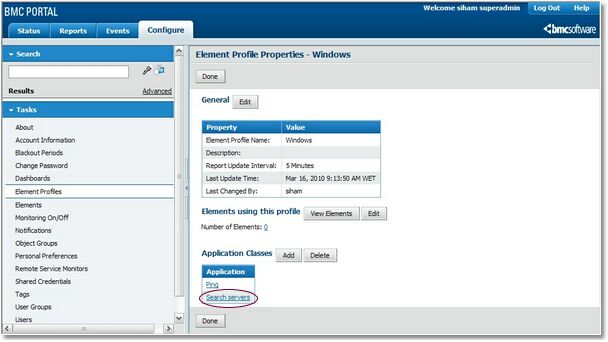
Element Profile Properties
| 9. | Click Done to save the changes made. The application class is now added to all the elements in the selected Element Profile. |
|


