|
By default, the solution discovers and monitors all volumes and LUNs in the NetApp Filers. Discovering and collecting volumes and LUNs metrics are resource-intensive actions that can create extra workload on the targeted system. To limit the number of instances created and therefore reduce the system resource consumption, administrators can disable the monitoring of all the volumes and LUNs of a system.
To disable Volumes and LUNs monitoring
| 2. | Under Tasks, click Elements |
| 3. | Select the Element for which you wish to disable volumes and/or LUNs monitoring and click Edit. |
| 4. | Scroll down to Application Classes > click the Application class for which you want to enable the debug mode > click Edit. |
| 5. | Click Thresholds, Properties and Credentials > Edit. |
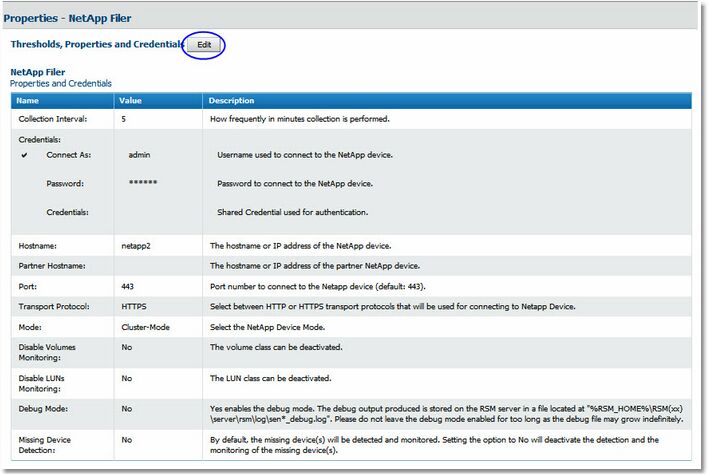
NetApp Filer - Properties
| 6. | Select Yes from the Disable Volumes Monitoring and Disable LUNs Monitoring drop-down lists. |
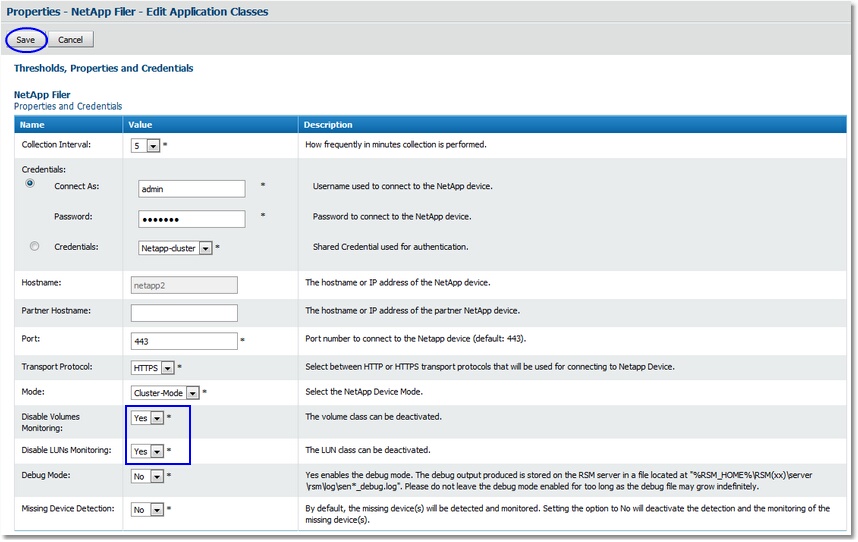
NetApp Filer - Disabling Volumes and LUNs monitoring
| 7. | Click Save. The Success, changes have been saved message indicates that the modifications have been registered. |
|


