| 1. | In the Configure tab, click the Element to which you wish to add the BMC Performance Manager Express for SharePoint Application Class to display the Element Properties page. Scroll down to Application Classes > Add. Make sure that the element's platform is defined as <Applications>. |
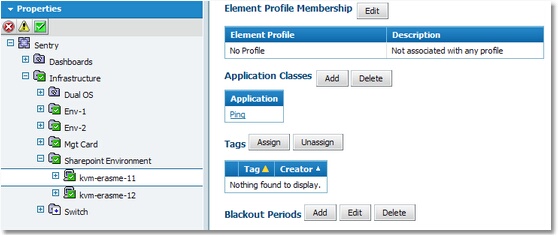
Adding an Application Class
| 2. | On the Properties – <Element> – Add Application Classes page > Select Category > Applications. |
| 3. | In the available Application Class list, select the application class applicable to the element and click Next. |

Application Class Properties
| 4. | The Properties and Credentials page appears asking for the information required for monitoring SharePoint Servers. Enter the required information. |
| 5. | Thresholds are automatically set by BMC Performance Manager Express for SharePoint. It is recommended that you leave the default thresholds as they are. Click Finish. Details on how to modify thresholds are given in the User Guide. |
You can now return to the Status tab to view the monitoring of the element by BMC Performance Manager Express for SharePoint.
|


