Enable the Debug Mode


Enable the Debug Mode |
|
|
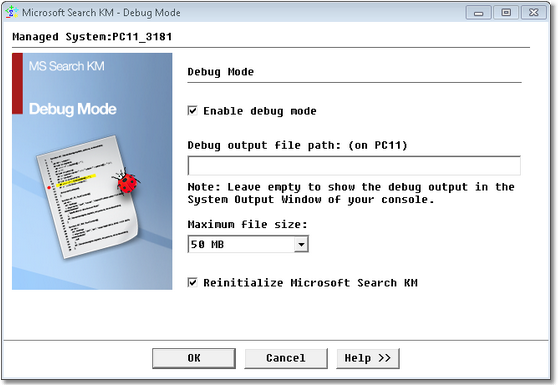
By default, Microsoft Search KM for PATROL sends only the most critical information, warning and error messages to the System Output Window of the PATROL Consoles. Most often, this information is accurate enough to ensure that Microsoft Search KM for PATROL is working properly. If you encounter an issue and wish to report it to Sentry Software, you will be asked to enable the Debug Mode and provide the debug output to the Sentry Software support team. To enable the debug mode: 1.Right-click the main Microsoft Search instance > KM Commands > KM Settings > Debug... 2.Select Enable debug.
Enabling the Debug Mode 3.Enter the path for the debug output file on the local server. When left empty, the debug output will be displayed in the system output window of your console. 4.Select the maximum size that the debug file can reach. 5.Select the Reinitialize option if you wish all the processes associated to the KM to be stopped and to automatically trigger a discovery before generating the debug file. There could be some loss of debug information by the PATROL console, if debug is enabled just as the PATROL Agent is starting as it is not yet connected to the PATROL Agent. In other cases, or when you want to trace the activity of Microsoft Search KM for PATROL during a few minutes, some debug information may be lost by the PATROL Console owing to a full buffer. In such cases, it may help to send the debug output of Microsoft Search KM for PATROL to a specified file.
|