Modify Alert Thresholds


Modify Alert Thresholds |
|
|
Whenever possible, Microsoft Search KM for PATROL automatically sets thresholds for parameters. These thresholds are retrieved from the information available from the agents and they are generally accurate. Generally, there is no need to modify these thresholds but in case Microsoft Search KM for PATROL cannot obtain them, or if you prefer a more fault-tolerant monitoring, you can modify the thresholds of each parameter through the command menu.
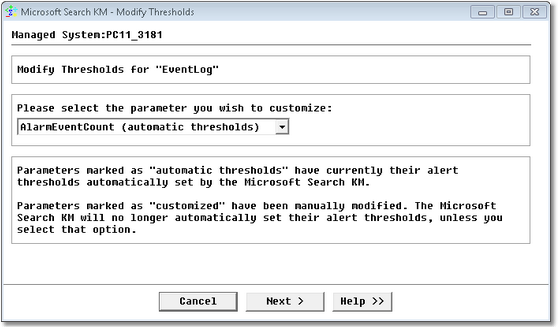
Modify Alert Thresholds — Selecting Parameter
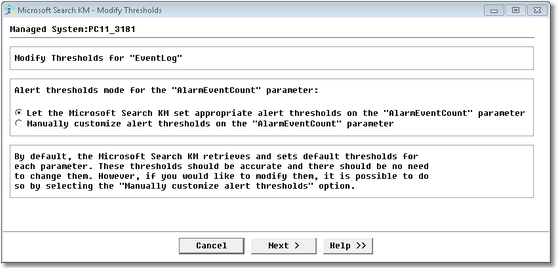
Modify Alert Thresholds — Selecting Alert Threshold Mode •If you have selected the option Let the Microsoft Search KM for PATROL set appropriate alert thresholds, Microsoft Search KM for PATROL automatically determines and sets the alert thresholds best suited to the parameter/component/system. Click Next to view the threshold values and then Finish to validate the operation.
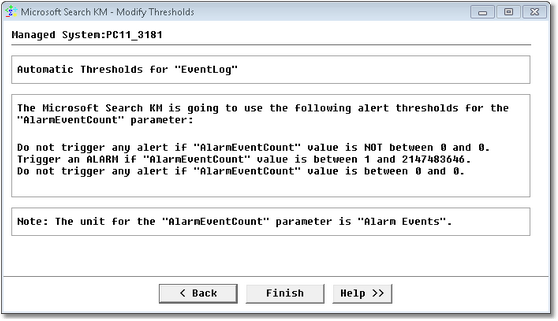
Modify Alert Thresholds — Automatic Alert Threshold Mode •If you have selected the option Manually customize alert thresholds, a panel is displayed allowing you to define new threshold values for the parameter/component/system. Click Finish to validate the operation.
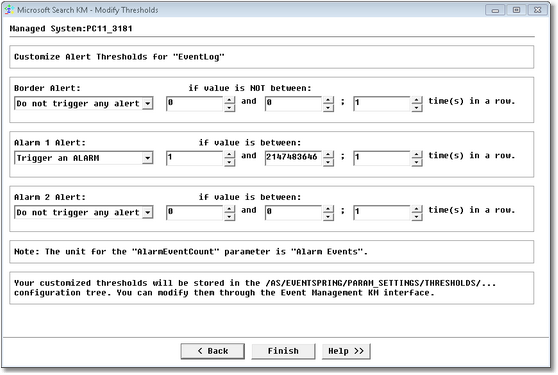
Modify Alert Thresholds — Manual Alert Threshold Mode
See Also |