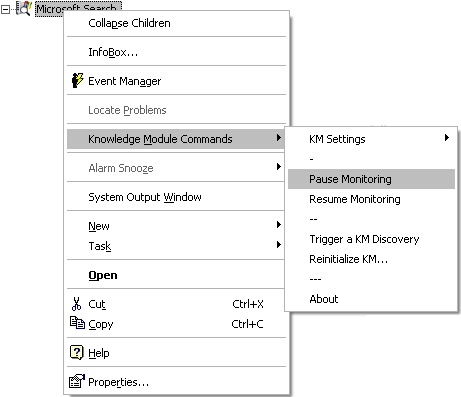
Pause/Resume Monitoring


Pause/Resume Monitoring |
|
|
In order to perform certain tasks - maintenance for example, it is often useful to pause the monitoring of an object or even of the whole system by Microsoft Search KM for PATROL. To pause the monitoring of a specific component, right-click the component/system icon > Knowledge Module Commands > Pause Monitoring.
Pause/Resume Monitoring When paused, the object/system is still displayed in the PATROL Console but displayed with an OFFLINE status. The collect for that particular object is no longer executed, and thus, no alert is longer triggered. To restart the monitoring of the object/system click Resume Monitoring in the menu. |