Difference between a flat file and a LOG file


Difference between a flat file and a LOG file |
|
|
Flat files are entirely updated and therefore need to be parsed entirely, as opposed to LOG files where new lines are appended at the end of the file - and hence only these new lines need to be analyzed.
String Searches of Flat vs LOG filesThe string searching function works differently on "running sources" i.e. LOG files and never-ending OS commands; than on flat sources (flat files, OS commands, Web requests, etc.): Running sources: LOG filesOn "running sources" (LOG files and never ending OS commands), the strings are searched only in new lines since the last polling. For a string search in a running source, two graphs are built:
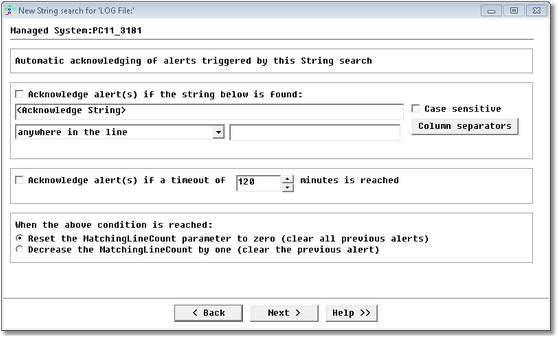
In addition, for LOG files and never-ending OS commands, you can specify auto-acknowledging strings that will automatically reset the graph to the "number of matches". Automatic acknowledgement of string search alerts (LOG files and "never-ending" command lines only)Each time the specified strings have been found, the MatchingLineCount parameter will increase and will trigger an alert. The automatic acknowledgement feature allows you to make the MatchingLineCount graph go back to zero and reset its status to 'normal'.
Automatic Acknowledgement of String Search Alerts
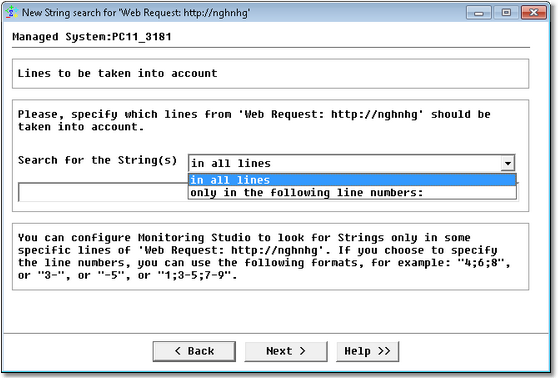
Flat sourcesOn "flat sources" (flat files, OS commands, Web requests, database queries), the strings are searched within the entire source (the whole file, the whole standard output, the whole HTTP response, the whole dataset) every time. String search in a flat source: Line selection. In flat sources, you have the option to select the lines in which to search for the specified string(s):
Setting Parameters for String Search on Flat Files
For a string search in a flat source, one graph is built: Number of matches at a polling. |