|
Monitoring Studio KM for PATROL runs OS commands to collect process information. In order to gather all process information, advanced privileges are sometimes required. Monitoring Studio allows you to set or modify the process command credentials that will be used for running OS commands.
On Windows Systems
| 1. | Right-click the Monitoring Studio icon > KM Commands > Options > Process Monitoring Credentials... |
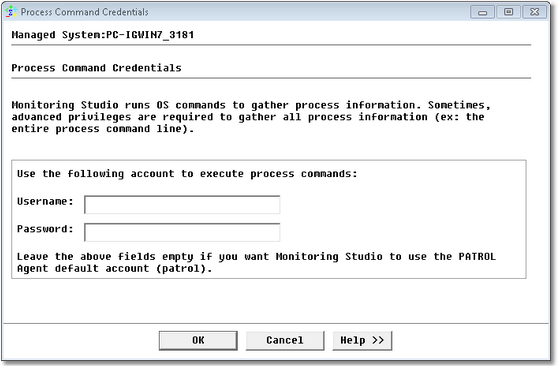
Setting Process Command Credentials on Windows Systems
| ▪ | Enter a username and password. |
| 2. | Click OK to save your settings. |
On Unix/Linux Systems
Depending on the targeted platform, Monitoring Studio may use some external system utilities to gather information. Sometimes the PATROL Agent default account does not have sufficient privileges to execute these commands and it is not possible in your environment to give super-user rights to the PATROL Agent. In such case Monitoring Studio can use the "sudo" utility to execute external commands as "root". The "sudo" utility helps UNIX system administrators secure their environment by authorizing some users to execute only certain commands specified as another user account (typically root). If this applies to you, the "sudo" options feature could be a good workaround.
| 1. | Ensure that the sudo utility is installed on the system, and that the "/etc/sudoers" file is configured to allow the PATROL Agent to execute the selected commands as root. |
| 2. | Right-click the Monitoring Studio icon > KM Commands > Options > Process Monitoring Credentials... |
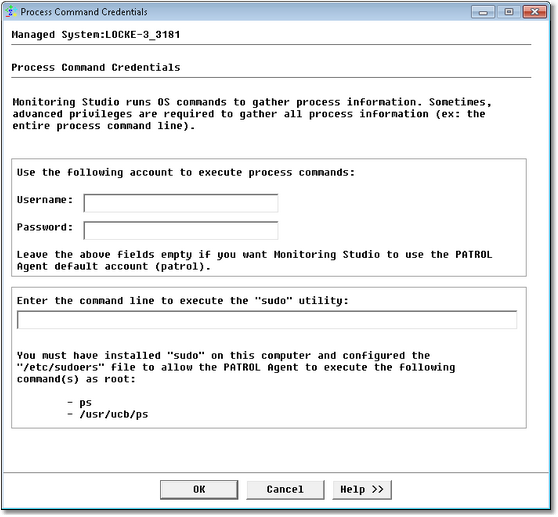
Setting Process Command Credentials and Command Line on Unix/Linux Systems
| 3. | Enter the user credentials to execute external "ps" command |
| 4. | Enter the command line to execute the sudo utility |
| 5. | Click OK to save your settings. |
| 

