|
Monitoring Studio provides two ways for renaming objects:
| • | through the Edit KM command. Please note that the object ID cannot be changed with this method. |
| • | through the Rename KM Command. Both the object display name and the object ID can be changed with this method. |
Using the Edit KM Command
| 1. | Right-click on the object icon > KM commands > Edit. |
| 2. | Follow the wizard steps until you arrive at the last panel shown below: |
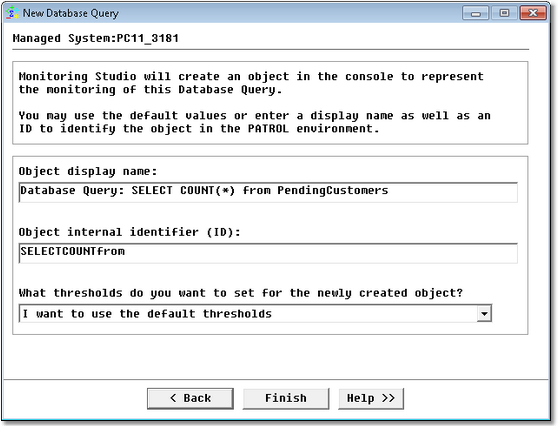
Renaming an object
| 3. | Change the object label/display name, and click Finish. |
| 4. | The object icon will now display the new label in the PATROL console. |
Using the Rename KM Command
| 1. | Right-click on the object icon > KM commands > Rename. |
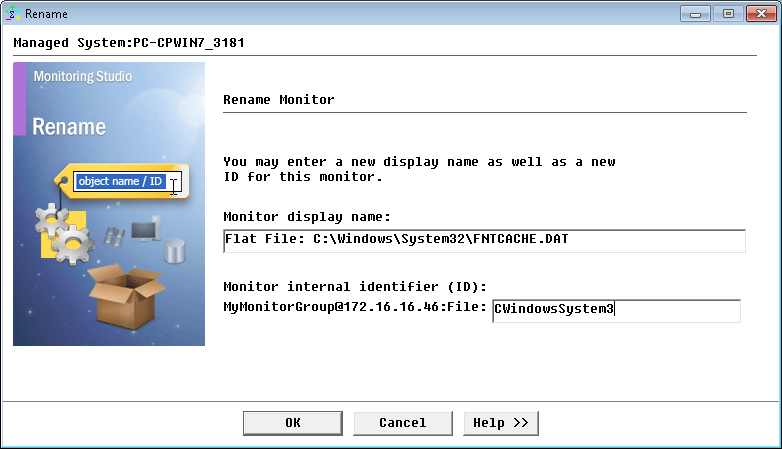
Modifying an object ID
| 2. | Modify the Object display name and/or the Object internal Identifier (ID) and click OK. |
| 3. | If you modified the object ID, a pop-up asks you to confirm your modification. If you are certain that the new ID will not cause any problems, click Yes. The PATROL console will display the new label and will update the ID as well. |
|


