|
Alert Actions enable you to choose specific actions to be executed when a failure is detected. With Alert Actions, it is possible to customize the way a problem notification is performed.
Monitoring Studio can be configured to run one, several, or all types of Alert Actions when an alert is triggered for a monitored technology. Alert actions can be specified for a Monitor Group or for individual Monitors. The settings and functionality of these two features are similar but, the Group Alert Actions apply to all the Monitors of a group while individual Alert Actions apply to the Monitor for which they are defined.
 To avoid redundancy, we have chosen to illustrate this chapter with the Group Alert Action panel. Note that the options for configuring the Monitor Alert Actions are identical and operate in the same manner. To avoid redundancy, we have chosen to illustrate this chapter with the Group Alert Action panel. Note that the options for configuring the Monitor Alert Actions are identical and operate in the same manner.
To configure group or monitor alert actions
| 1. | Edit or create the Monitor Group or the Monitor for which you want to define alert actions. |
| 2. | Click the Group Alert Actions/Alert Actions button to display the configuration panel. |
| 3. | Select one or several alert actions you wish Monitoring Studio to perform when a threshold is breached. Macros can be used to customize alert actions, refer to the Alert Actions Macros chapter for detailed information: |
| ▪ | Event: select the Upon Threshold Breach, Trigger an Event option to have Monitoring Studio trigger a PATROL event. Use the Event Content field to provide the string that will be displayed with the event. |

| ▪ | Annotation: select the Upon Threshold Breach, Annotate the Graph option to have Monitoring Studio annotate the attribute's graph. Use the Annotation Content field to provide the string that will be displayed at the annotation point. |

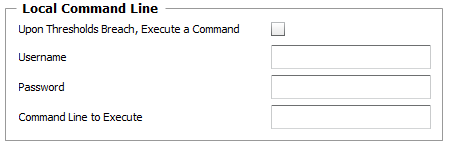
| ▪ | Local Command Line (Group Alert Actions): Select the Upon Thresholds Breach, Execute a Command option to have Monitoring Studio execute a command line on the system where the PATROL Agent is installed. Provide the Username and Password required to run the command line (or leave these fields blank to use the PATROL Agent's default account) as well as the Command Line you wish the solution to execute. |
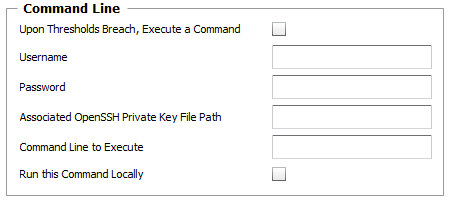
| ▪ | Command Line (Alert Actions): Select the Upon Thresholds Breach, Execute a Command option to have Monitoring Studio execute a command line. Provide valid credentials to run the command line on the target host as well as the Command Line you wish the solution to execute. For remote UNIX/Linux and other platforms, you may need to provide the Associated OpenSSH private key Path, and the optional PassPhrase in the Password field. Select Run this Command Locally to execute the command on the PATROL Agent. |
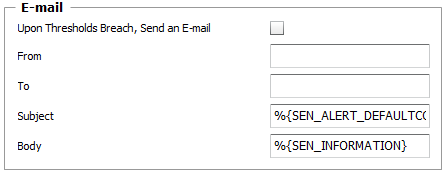
| ▪ | E-mail: Select this option to have Monitoring Studio send an E-mail. Provide the sender and the recipient email address in the From and To fields. To send the email to multiple recipients, use the comma (,) or the semi-column (;) to separate the recipients' email addresses. The %{SEN_ALERT_DEFAULTCONTENT} and %{SEN_INFORMATION} macros are proposed by default to provide information about the event. |
 An SMTP server is required to receive alerts by email. For more information refer to Configuring the SMTP Server. An SMTP server is required to receive alerts by email. For more information refer to Configuring the SMTP Server.
|


