|
A polling interval defines how often new data is collected. A new collect can be performed from once every second, to once in a day. Polling intervals can be set for objects created by TrueSight Operations Management - Monitoring Studio that collect data (files, processes, command lines, SNMP polling etc.). By default, the polling interval is set to 2 minutes on all objects, which can be modified at any time.
To set the polling interval:
| 2. | In the Monitors section, select the monitoring method for which you need to set the polling interval. |
| 3. | The related panel is displayed. Click the Polling Interval button. |
 The option to set polling intervals is not available for string searches, numeric values and SNMP trap instances, since either they do not have collectors, or as in the case of SNMP traps – have collectors that react to events. The option to set polling intervals is not available for string searches, numeric values and SNMP trap instances, since either they do not have collectors, or as in the case of SNMP traps – have collectors that react to events.
| 4. | Configure the polling interval options: |
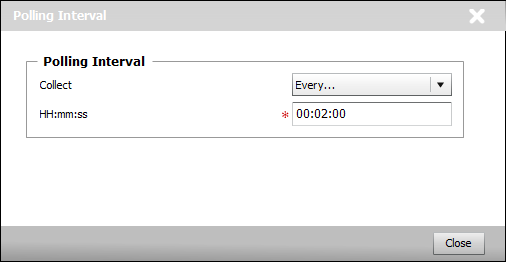
Polling interval settings
| 5. | Collect: Select the frequency of the polling: |
| ✓ | Every...: This option allows you to specify the number of hours, minutes, and/or seconds at which the polling operation will be performed. |
| ✓ | Collect once a day at: This option allows you to specify the time of day at which the polling operation will be performed, by setting the hour (24 hours), minutes and seconds (for example: if you wish the polling to be performed once a day at 2:30 pm, set the timer to: 14:30:00). |
| ✓ | Collect once a week on <weekday> at: This option allows you to specify the time of a specific day at which the polling operation will be performed, by setting the hour (24 hours), minutes and seconds (for example: if you wish the polling to be performed once a week at 2:30 pm, set the timer to: 14:30:00). |
|


