|
Specific information, such as virtual disk size, node name, RAID array, etc are collected via the evaperf utility and Storage System Scripting Utility (SSSU.EXE) which are command line interfaces provided by HP that allows administrators to control EVA disk arrays. HP Command View EVA valid account credentials (username and password) are required to activate SSSU.
Prior to install BMC Performance Manager Express for HP EVA:
| 1. | First, note that BMC Performance Manager Express for HP EVA must be installed on the HP Storage Server provided with the HP EVA disk array. The HP Storage Server usually comes bundled with the HP EVA disk array and is fully pre-installed by HP. |
| 2. | Make sure the HP Storage Server is properly configured to interact with the HP EVA disk array. |
| 3. | Make sure that HP StorageWorks Command View 9.1 or higher is properly installed on the Storage Server. All the provided features must be installed: |
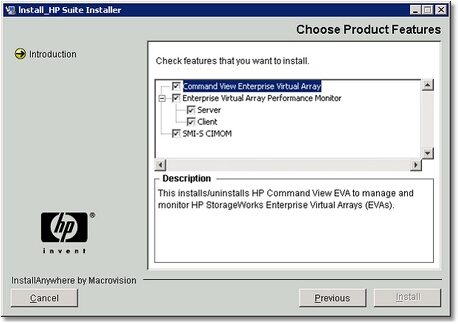
Choosing Product Features
| 4. | Since some information such as virtual disk size, node name, RAID array, etc. is collected via the Storage System Scripting Utility (SSSU.EXE). Valid account credentials (username and password) are required to run SSSU. |
|


