Ethernet/Fiber Port Traffic Report


Ethernet/Fiber Port Traffic Report |
|
|
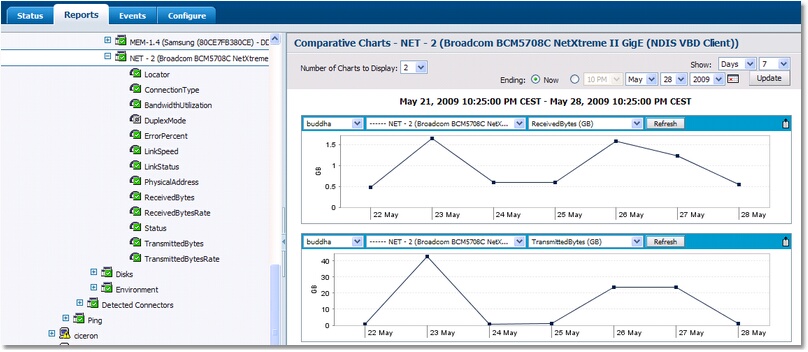
BMC Performance Manager Express for Hardware enables you to generate a report showing usage statistics returned by a specific Ethernet/fiber port. The report shows the total number of received and transmitted bytes for the selected port. It can easily be customized to show the data that administrators can use to optimize network traffic. To generate an Ethernet/Fiber Port Traffic Report, click on the discovered Network / FC instance > “Reports” tab ●Select the data you wish to generate a report for: Received or Transmitted byte traffic ●Select the period that you wish the report to cover: number of days or hours ●Select the interval to apply to the report data: hourly or daily
Report – Ethernet/Fiber Port Traffic Report So from the above report you can see that 0.4759 GB were received and 0.5274 GB were transmitted on the 22nd. Whereas on the 23rd, 1.65 GB were received and 41 GB were transmitted. |