Monitors Nothing Other than Network Interfaces


|
Monitors Nothing Other than Network Interfaces |
|
|
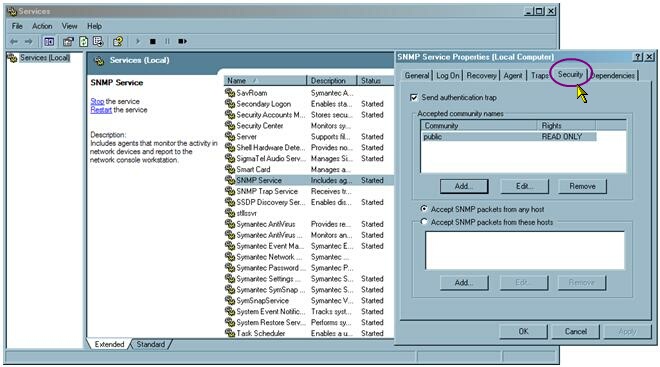
This is typically an SNMP issue. Many manufacturer-provided hardware agents use the SNMP technology (DELL OpenManage, HP Insight Management, and Fujitsu-Siemens ServerView for example). Since BPM Express for Hardware gathers hardware information from these agents, you need to enable and properly configure the SNMP layer on the managed servers if an SNMP-based agent is running on them. However sometimes, like in the case of HP® (Compaq®) ProLiant® servers, the network interface is detected and displayed whilst no other hardware component is detected by BPM Express for Hardware – simply because it cannot communicate with the managed element. So enabling and authorizing the managed server to communicate through the SNMP protocol is essential. Configuring SNMP on Windows servers 2003, 2008, 2012 Starting with Windows Server 2003, the SNMP service is not configured to allow the "public" community by default. As a consequence, even if the SNMP service is properly installed and the hardware agent properly running, BPM Express for Hardware is not able to gather any hardware information from the SNMP agent. Therefore, on Windows Server computers that run an SNMP-based hardware agent (DELL OpenManage, HP Insight Management or Fujitsu-Siemens ServerView), you first need to install the SNMP service (not installed by default) and then configure it to allow a community to access the SNMP agent. 1.In the Services administrative tool, right-click SNMP service > Properties. Click Security:
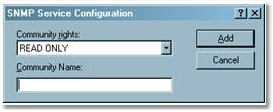
Troubleshooting: SNMP Service - Properties 2.Click on the first Add button and enter a community name that will allow access to the SNMP agent (READ ONLY):
Troubleshooting: SNMP Service Configuration 3. Click OK. The new settings are taken into account immediately. 4.Next, you enter the community string for this server on the Portal: Log on as a user > Configure tab > Elements 5.Expand your infrastructure tree and select the element for which you need to enter the SNMP community string > Edit. 6.Scroll down to Application Classes section > Hardware (<platform>) > Edit > Properties and Credentials. 7.Enter the SNMP community string in order to enable BPM Express for Hardware to monitor all hardware components of the element and not just network interfaces.
|