Example: XML LOG File Parsing

Home  Previous  Next

Monitoring the content of an XML LOG file with Monitoring Studio

Specifying the file to monitor

1.Right-click the main Monitoring Studio icon or your previously-created application icon > KM Commands > New > File monitoring and analysis…
2.Specify that file is a LOG file, i.e. that Monitoring Studio needs to monitor only the new lines that are being added to the file.
3.Specify the path to the file. You can use wildcards (* and ?) if the name of the file changes over time (like a time-stamped LOG file). In such case, Monitoring Studio monitors the most recently updated file which matches with the specified path.
4.Enter a label and ID for the icon which is going to be created in the PATROL Console.

You have successfully setup the monitoring of an XML log file. Now to parse this file, you first need to preprocess the XML text in order to then run string searches or perform numeric value extraction on the result.

Pre-processing the content of the file (converting XML to CSV)

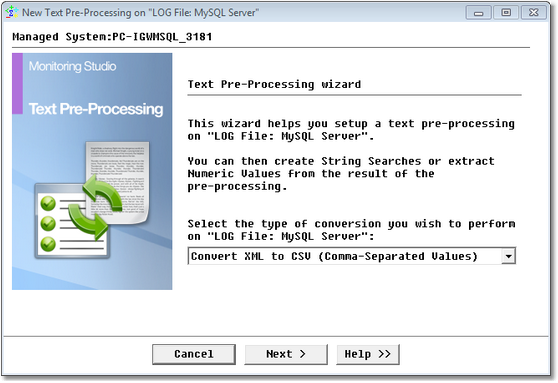
Right-click the File object which has been created > KM Commands > New > Text Pre-Processing… Select the Convert XML to CSV option.

EX_TextPreProcess_1Welcome

Selecting a Type of Conversion to Apply to a Log File

In this example, the records in this XML LOG file are in the following format:

<rec>

<vm>su37sr72</vm>

<ts>2003-09-22 11:47:35.511 CEST</ts>

<level>ERROR</level>

<class></class>

<method></method>

<ctx>

<pid>A141607</pid>

<appid>frontnet</appid>

<cname>User_3_0.getDefaultUserRole</cname>

<reqid>2</reqid>

<sesid>1uEPHTdRG2mM6GCfhv1EkwcBrCi68ffGizgIEtGHWFMt5Hc7lwE7!-1625978434!-1455528670!7501!7502!1064223951289</sesid>

<thrid>ExecuteThread: '68' for queue: 'default'-f7c8b25c01</thrid>

<cthid>ExecuteThread: '68' for queue: 'default'-f7c8b1696c</cthid>

</ctx>

<msg>

<![CDATA[FNNotAuthorizedException;FEA002002;No authorization to execute service operation]]>

</msg>

<exc>

<ts>2003-09-22 11:47:35.509 CEST</ts>

<sev>ERROR</sev>

<ctx>

<pid>A141607</pid>

<appid>frontnet</appid>

<cname>User_3_0.getDefaultUserRole</cname>

<reqid>2</reqid>

<sesid>1uEPHTdRG2mM6GCfhv1EkwcBrCi68ffGizgIEtGHWFMt5Hc7lwE7!-1625978434!-1455528670!7501!7502!1064223951289</sesid>

<thrid>ExecuteThread: '68' for queue: 'default'-f7c8b25c01</thrid>

<cthid>ExecuteThread: '68' for queue: 'default'-f7c8b1696c</cthid>

</ctx>

<stack>

<![CDATA[com.csg.pb.frontnet.exec_arch.calx.FNNotAuthorizedException: No authorization to execute service operation

at com.csg.pb.frontnet.services.user_3_0.bean.UserBean_3_0.getDefaultUserRole(UserBean_3_0.java:345)

at com.csg.pb.frontnet.services.user_3_0.bean.UserBean_3_0_3c05dc_EOImpl.getDefaultUserRole(UserBean_3_0_3c05dc_EOImpl.java:145)

at com.csg.pb.frontnet.services.user_3_0.bean.UserBean_3_0_3c05dc_EOImpl_WLSkel.invoke(Unknown Source)

at weblogic.rmi.internal.BasicServerRef.invoke(BasicServerRef.java:360)

at weblogic.rmi.cluster.ReplicaAwareServerRef.invoke(ReplicaAwareServerRef.java:93)

at weblogic.rmi.internal.BasicServerRef.handleRequest(BasicServerRef.java:329)

at weblogic.rmi.internal.BasicServerRef.dispatch(BasicServerRef.java:178)

at weblogic.rmi.internal.ServerRequest.sendOneWayRaw(ServerRequest.java:92)

at weblogic.rmi.internal.ServerRequest.sendReceive(ServerRequest.java:112)

at weblogic.rmi.cluster.ReplicaAwareRemoteRef.invoke(ReplicaAwareRemoteRef.java:263)

at weblogic.rmi.cluster.ReplicaAwareRemoteRef.invoke(ReplicaAwareRemoteRef.java:230)

at weblogic.rmi.internal.ProxyStub.invoke(ProxyStub.java:35)

at $Proxy1401.getDefaultUserRole(Unknown Source)

at com.csg.pb.frontnet.services.user_3_0.bean.UserCA_3_0.getDefaultUserRole(UserCA_3_0.java:244)

at com.csg.pb.frontnet.apps.common.brokers.FnUserBroker.getDefaultPortalUserSettings(FnUserBroker.java:56)

at com.csg.pb.frontnet.apps.common.brokers.FnUserBroker.getDefaultMandant(FnUserBroker.java:280)

at com.csg.pb.frontnet.apps.common.base.DefaultAuthorizationStrategy.resetBusinessUnitParam(DefaultAuthorizationStrategy.java:72)

at com.csg.pb.frontnet.apps.common.base.DefaultAuthorizationStrategy.assertAvailableBusinessUnit(DefaultAuthorizationStrategy.java:48)

at com.csg.pb.frontnet.apps.common.base.AuthorizationServlet.doGetManaged(AuthorizationServlet.java:99)

at com.csg.cs.servlet.CSServlet.doGet(CSServlet.java:82)

at javax.servlet.http.HttpServlet.service(HttpServlet.java:740)

at com.csg.cs.servlet.CSServlet.service(CSServlet.java:459)

at com.csg.pb.frontnet.util.servlet.FNServlet.service(FNServlet.java:334)

at com.csg.pb.frontnet.apps.common.base.CommonServlet.service(CommonServlet.java:66)

at javax.servlet.http.HttpServlet.service(HttpServlet.java:853)

at weblogic.servlet.internal.ServletStubImpl.invokeServlet(ServletStubImpl.java:262)

at weblogic.servlet.internal.TailFilter.doFilter(TailFilter.java:21)

at weblogic.servlet.internal.FilterChainImpl.doFilter(FilterChainImpl.java:27)

at com.csg.cs.security.wls.enforce.IntranetPLEnfFilter.doFilter(IntranetPLEnfFilter.java:174)

at weblogic.servlet.internal.FilterChainImpl.doFilter(FilterChainImpl.java:27)

at weblogic.servlet.internal.RequestDispatcherImpl.forward(RequestDispatcherImpl.java:287)

at com.csg.pb.frontnet.apps.common.util.RequestForwarder.forward(RequestForwarder.java:48)

at com.csg.pb.frontnet.apps.portals.base.PortalSelectionController.processSelectionPage(PortalSelectionController.java:49)

at com.csg.pb.frontnet.apps.portals.base.PortalSelectionController.doGetManaged(PortalSelectionController.java:29)

at com.csg.cs.servlet.CSServlet.doGet(CSServlet.java:82)

at javax.servlet.http.HttpServlet.service(HttpServlet.java:740)

at com.csg.cs.servlet.CSServlet.service(CSServlet.java:459)

at com.csg.pb.frontnet.util.servlet.FNServlet.service(FNServlet.java:334)

at javax.servlet.http.HttpServlet.service(HttpServlet.java:853)

at weblogic.servlet.internal.ServletStubImpl.invokeServlet(ServletStubImpl.java:262)

at weblogic.servlet.internal.TailFilter.doFilter(TailFilter.java:21)

at weblogic.servlet.internal.FilterChainImpl.doFilter(FilterChainImpl.java:27)

at com.csg.cs.security.wls.enforce.IntranetPLEnfFilter.doFilter(IntranetPLEnfFilter.java:174)

at weblogic.servlet.internal.FilterChainImpl.doFilter(FilterChainImpl.java:27)

at weblogic.servlet.internal.WebAppServletContext.invokeServlet(WebAppServletContext.java:2684)

at weblogic.servlet.internal.ServletRequestImpl.execute(ServletRequestImpl.java:2412)

at weblogic.kernel.ExecuteThread.execute(ExecuteThread.java:140)

at weblogic.kernel.ExecuteThread.run(ExecuteThread.java:121)

]]>

</stack>

</exc>

</rec>

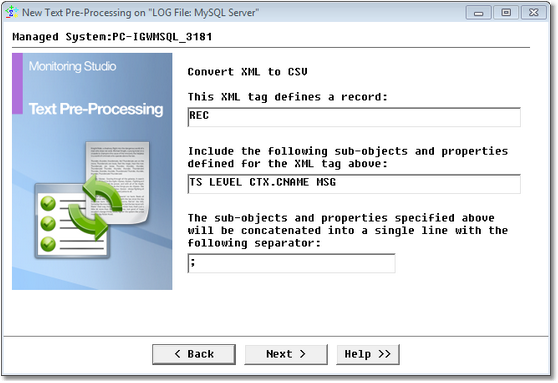
So, <REC> is the XML tag for each new record. Let’s say that we would like to retrieve the <TS> value, the <LEVEL> value, the <CNAME> value under <CTX> and the <MSG> value.

Therefore, we are specifying that REC is the XML tag for a new record and that we would like to include the value for the following properties and sub-tags:TS LEVEL CTX.CNAME MSG. Please note the syntax "CTX.CNAME" which means the value of CNAME under the CTX tag.

EX_TextPreProcess_2Param

Defining the Conversion Parameters

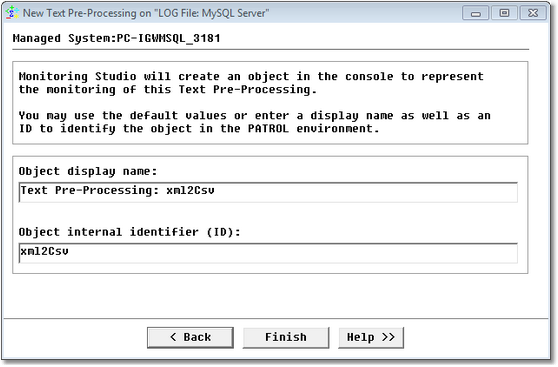
Then, specify a label and ID for the text pre-processing object that will be created under the file icon.

EX_TextPreProcess_3ObjectDefinition

Defining the Object

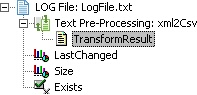
As a result, we get a new icon in the PATROL Console, corresponding to the XML to CSV pre-processing:

EX_TextPreProcess_4TreeView

Accessing the Result File

This object has a single TransformResult text parameter as a result of the XML to CSV pre-processing:

2003-09-22 11:47:35.511 CEST;ERROR;User_3_0.getDefaultUserRole; FNNotAuthorizedException;FEA002002;No authorization to execute service operation]]>;

2003-09-22 11:52:05.984 CEST;ERROR;User_3_0.getDefaultUserRole; FNNotAuthorizedException;FEA002002;No authorization to execute service operation]]>;

2003-09-22 12:06:18.272 CEST;ERROR;User_3_0.getDefaultUserRole; FNNotAuthorizedException;FEA002002;No authorization to execute service operation]]>;

2003-09-22 12:09:53.920 CEST;ERROR;User_3_0.getDefaultUserRole; FNNotAuthorizedException;FEA002002;No authorization to execute service operation]]>;

2003-09-22 12:10:39.557 CEST;ERROR;KycBeneficialOwnerProfiles; FNDBDataAccessFailureException;RDS001003;Code not Found - TableName: Landcode_1_RefTableObject, BusinessUnit: 0012, Language: 891, Code: 001]]>;

2003-09-22 12:10:39.566 CEST;ERROR;KycBeneficialOwnerProfiles; FNDBDataAccessFailureException;RDS001003;Code not Found - TableName: Landcode_1_RefTableObject, BusinessUnit: 0012, Language: 891, Code: 001]]>;

2003-09-22 12:10:56.637 CEST;ERROR;CIFS_Customer_1.getCustomer; FNDBDataAccessFailureException;RDS001002;Code not Found - TableName: Service_Status_InfoRefTableObject, BusinessUnit: 0000, Code: CIFS_Customer_1_0]]>;

2003-09-22 12:10:56.643 CEST;SEVERE;CIFS_Customer_1.getCustomer; FNServiceNotAvailableException;FEA000001;Service not available - Service FNServiceState.getState]]>;

2003-09-22 12:10:56.945 CEST;ERROR;BPST_UserProfile_3.getUsers; FNDBDataAccessFailureException;RDS001002;Code not Found - TableName: Service_Status_InfoRefTableObject, BusinessUnit: 0000, Code: BPST_UserProfile_3_0]]>;

2003-09-22 12:10:56.950 CEST;SEVERE;BPST_UserProfile_3.getUsers; FNServiceNotAvailableException;FEA000001;Service not available - Service FNServiceState.getState]]>;

2003-09-22 12:21:30.004 CEST;ERROR;User_3_0.getDefaultUserRole; FNNotAuthorizedException;FEA002002;No authorization to execute service operation]]>;

Searching for strings in the result of the XML-to-CSV pre-processing

1.Right-click the Text-Pre-Processing icon > KM Commands > New > String search
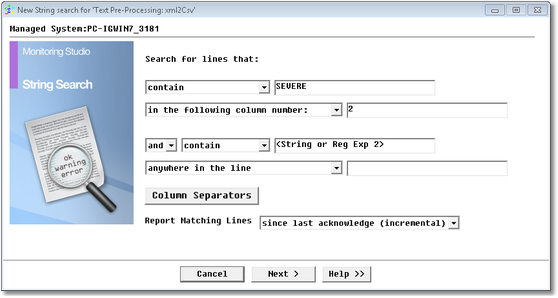
2.Search for lines that contain the string "SEVERE" in the second column, corresponding to XML records whose <LEVEL> is "SEVERE"

EX_TextPreProcess_5StringSearch

Performing a String Search Command on a Converted File

From the first pull-down list, select contain.
Type SEVERE and check the Case sensitive box.
From the second pull-down list, select in the following column number:
Type 2.
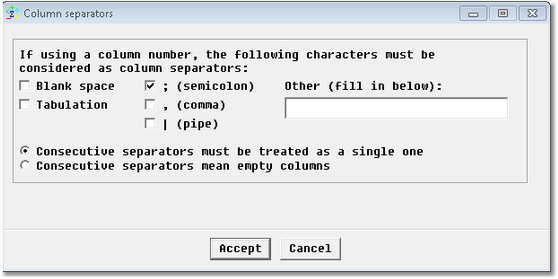
3.Click the Column separators button, uncheck all the separators except the semicolon and click Accept:

EX_TextPreProcess_5ColumnSeparator

Specifying the Column Separator

4.Click Next and follow the wizard wizard steps as for any normal string search on a LOG file,keeping the default values shown.
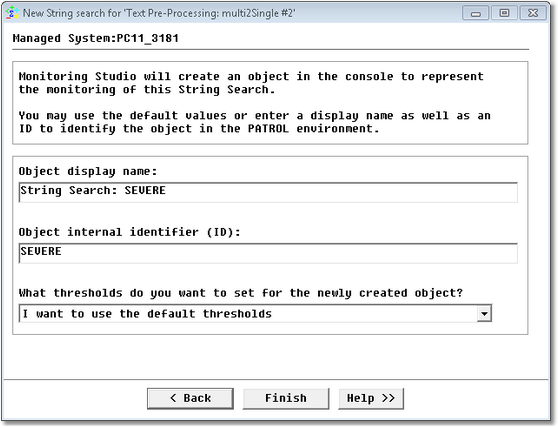
5.This brings us to the last panel, where we select the option I want to use the default thresholds and click Finish.

 EX_TextPreProcess_6StringSearchConfirm

String Search Confirmation

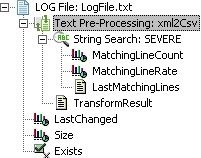
As a result, we get the following String search object: SEVERE under the XML-to-CSV pre-processing object.

EX_TextPreProcess_7StringSearchTreeView

Accessing the String Search Results

NoteYou can create as many string searches as you want on a file and on a text-processing object, and you can create several different text-processing objects on the same file object.