|
Monitoring Studio creates a Monitor instance in the PATROL Console for each configured element. This instance is defined by a name and an internal identifier. These values, set by default by Monitoring Studio, can however be modified while configuring the element:
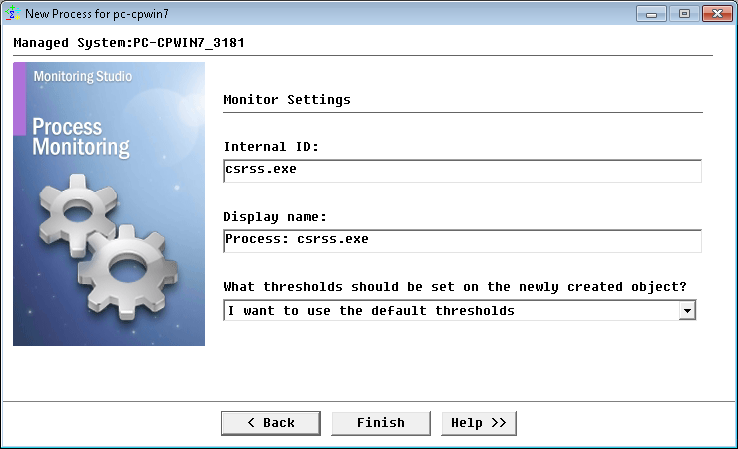
Configuring Monitor Settings
| 1. | Modify the fields of your choice: |
| ▪ | Internal ID: PATROL internal identifier of the Monitor instance. |
| ▪ | Display name: Label that will be displayed in the PATROL Console for the Monitor instance. |
| ▪ | What thresholds should be set on the newly created object?: Mode to be used to set alert thresholds: |
| ▪ | I want to use the default thresholds: Uses the default thresholds set by Monitoring Studio |
| ▪ | I want to set custom thresholds: Allows you to customize the thresholds for all parameters of the instance |
| ▪ | I want to use the default thresholds and customize them: Sets the default Monitoring Studio thresholds on certain parameters and then allows you to customize any/all of them. This is mainly intended to help save time if you wish to customize the thresholds of just one of many parameters for the instance, and leave the default settings for the others. |
| ▪ | I do not want to set any thresholds for now: No thresholds will be set on any parameter of the instance, and as a result no alerts will be triggered. Monitoring Studio will poll the object and return the output of the polling – but will not raise any alerts until you set thresholds. |
 If you select the "I want to use the default thresholds and customize them" option, the Set Thresholds panel will be prompted when you click Finish (certain parameters for the instance may appear with an asterisk symbol indicating that they already have thresholds). Thresholds can be set or modified at anytime by right-clicking on the instance > KM commands > Thresholds. If you select the "I want to use the default thresholds and customize them" option, the Set Thresholds panel will be prompted when you click Finish (certain parameters for the instance may appear with an asterisk symbol indicating that they already have thresholds). Thresholds can be set or modified at anytime by right-clicking on the instance > KM commands > Thresholds.
| 2. | Click Finish. The corresponding Process instance (<Process: Display Name>) is created in the PATROL Console. The collected parameters for the Process Monitor are listed in the SEN_MS_PROCESS chapter. |
| 

