Overview


Overview |
|
What is Monitoring Studio?Monitoring Studio KM for PATROL is the essential tool for all IT administrators who want to fulfill their custom monitoring needs. This toolbox enables you to monitor almost any technology (application, server, device, etc.) for which there is no out-of-the-box monitoring solution. In a few clicks, you can cover up to 100% of your technologies in your BMC monitoring environment. Compatible with Linux/UNIX and Windows, using Monitoring Studio is a simple and effective way to rapidly deploy the monitoring of custom technologies without any coding. It also has the benefits of a “standard” solution: maintenance, updates, patches, etc. to further respond to growing technological needs for specific business-critical technologies. With Monitoring Studio, it is possible to set up the monitoring of any technology, customize the way a notification is performed for an alert, or specify a recovery action to run when a problem occurs. How Does it Work?Monitoring Studio KM for PATROL is a Knowledge Module (KM) for BMC PATROL. Therefore, it must be installed on the following components of the PATROL framework:
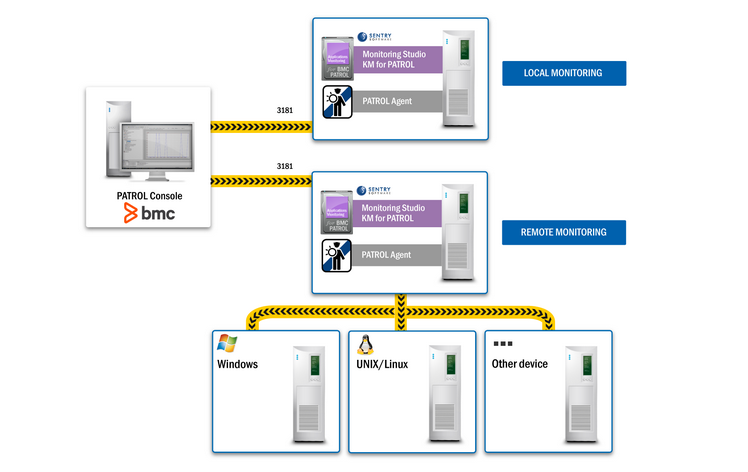
Monitoring Studio can be configured to monitor any technology locally and remotely. The diagram below shows how Monitoring Studio integrates within your BMC framework and shows interaction between all the components that compose your monitored environment.
What to Monitor with Monitoring Studio?Monitoring Studio KM for PATROL offers a large choice of Monitors easily configurable to monitor system elements, to query information about the targeted technology, and extract the relevant key metrics. Monitoring Studio allows you to monitor: Monitoring Studio then allows you to analyze the results of some of the above Monitors by searching for strings and regular expressions, extracting numeric values, mapping values, and creating instances dynamically to represent the components of the monitored technology. Then, administrators can easily define alert thresholds and alert actions to detect and react to critical conditions. Monitoring Studio also offers integration capabilities with Nagios plugins and allows you to import an existing Nagios configuration from a Nagios server. |