|
Many software technologies that run on any Windows operating system run as Windows services, running as background processes with no direct user interface and no logged-on user. Typically, they start automatically and are expected to keep on running without any human intervention. When one of these critical services fails, many users and external services can immediately be affected. Therefore, making sure that these services are seamlessly running is a key requirement for most system administrators.
To monitor a Windows service
| 1. | In the PATROL Console, right-click the Host or Monitor Group icon and select KM Commands > New > Monitor... |
| 2. | Select Windows Service from the drop-down list and click Next. |
 Please note that the System Credentials entered at the host level will be used to retrieve Windows Service information. Please note that the System Credentials entered at the host level will be used to retrieve Windows Service information.
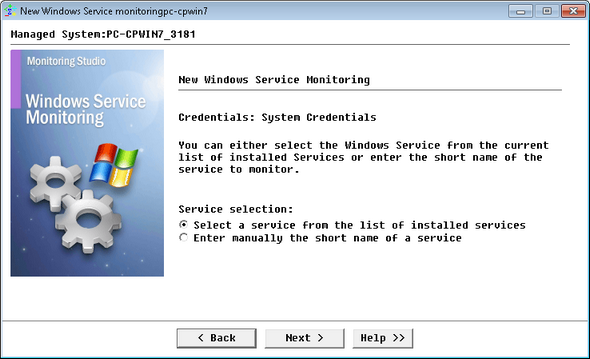
Monitoring a Windows Service - Service Selection
You can either:
To display the list of installed services
| 3. | Select the Select a service from the list of installed services option and click Next. |
| 4. | Select the service to be monitored and click Next. |
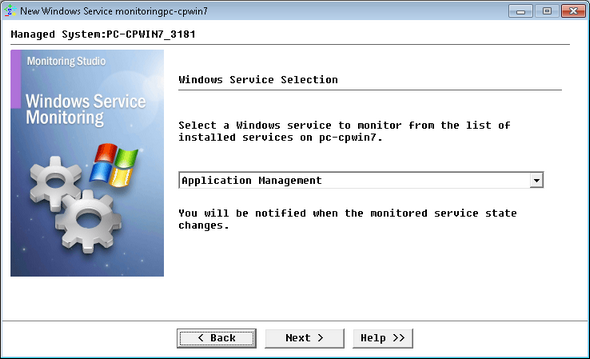
Monitoring a Windows Service - Windows Service Selection
To manually enter the short name of a service
| 3. | Select the Enter manually the short name of a service option and click Next. |
| 4. | Enter the Windows service short name to be monitored and click Next. |
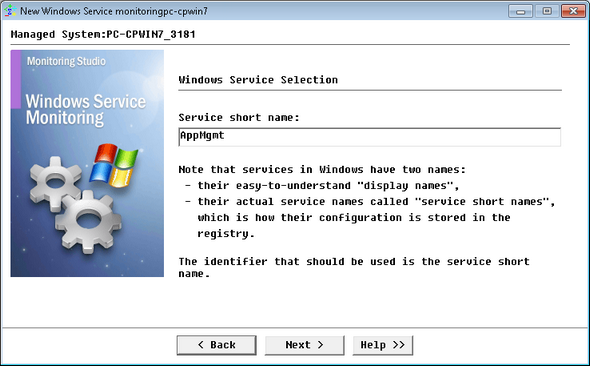
Monitoring a Windows Service - Windows Service Selection
| 5. | For each possible service state, you can select the value of the Status parameter: OK, Suspicious or Failed. By default, the service state will be interpreted as listed in the table below: |
|
|
|
Running
|
0 (OK)
|
Paused
|
1 (Suspicious)
|
Stopped
|
2 (Failed)
|
Start Pending
|
1 (Suspicious)
|
Continue Pending
|
1 (Suspicious)
|
Pause Pending
|
1 (Suspicious)
|
Stop Pending
|
1 (Suspicious)
|
Not Installed
|
2 (Failed)
|
Unknown
|
1 (Suspicious)
|
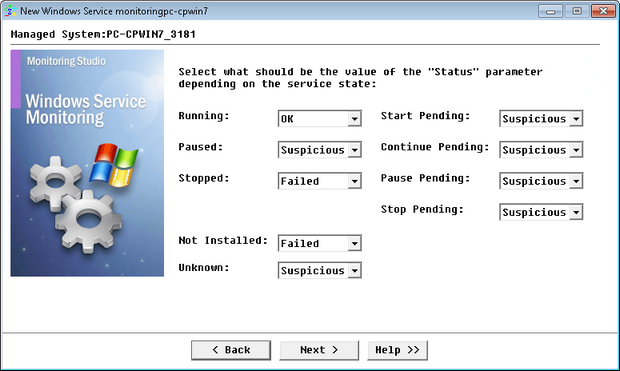
Monitoring a Windows Service - Parameter Value Selection
| 7. | Click Finish. The corresponding Windows Service instance (Windows Service: <Display Name>) is created in the PATROL Console. The collected parameters for Windows Service instances are listed in the SEN_MS_WINSERVICE chapter. |
| 

