|
PSL (PATROL Script Language) is a language developed by BMC for writing complex application discovery procedures, parameters, arbitrary commands, and tasks. This language is commonly used for KM development but can also be useful for IT administrators as they can access the internal information of the PATROL Agent through PSL commands.
The PSL Command Monitor fills the gap of what other monitors cannot offer you. This feature allows you to run PSL commands on the local PATROL Agent system using the default PATROL Agent credentials. You can then define String Searches, Numeric Value Extractions and Value Map that will help you parse and analyze the output of PSL commands.
 The PSL Command Monitor is intended for advanced users with PSL coding experience. The PSL Command Monitor is intended for advanced users with PSL coding experience.
To run a PSL command
| 1. | In the PATROL Console, right-click the Host or Monitor Group icon and select KM Commands > New > Monitor... |
| 2. | Select PSL Command from the drop-down list and click Next. |
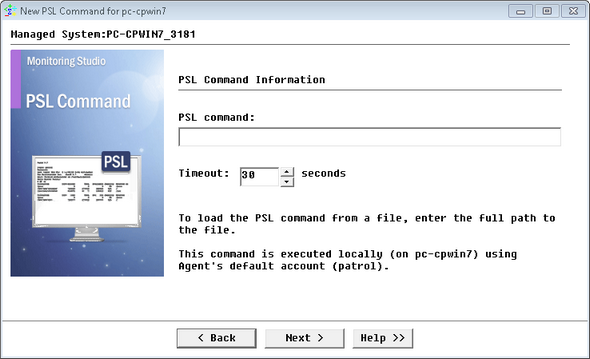
Running PSL Commands - PSL Command Information
| 3. | Set the following PSL Command Information options: |
| ▪ | PSL Command: Enter the PSL command or the full path to the PSL file that Monitoring Studio will execute. PSL commands are executed on local host, where the PATROL Agent is running. |
 The PSL file path can include environment variables (example: %PATROL_HOME%\lib\psl\patroldiags.psl). The PSL file path can include environment variables (example: %PATROL_HOME%\lib\psl\patroldiags.psl).
You can for example execute simple PSL commands to check the health of the PATROL Agent:
Examples:
| • | system("%PSLPS"); # Reports the PSL processes and their status |
| • | system("%DUMP RUNQ"); # Reports the list of items scheduled in the run queue |
| • | system("%STAT ALL"); # Reports all Agent memory usage statistics |
|
| ▪ | Timeout: Enter the time in seconds after which the PSL command will be stopped (Default: 30 seconds). If the timeout is reached, the value of the Status parameter will be set to 2 (Failed), indicating that the PSL command failed to execute properly. No further analysis will be performed. |
| 6. | Click Finish. The corresponding PSL Command instance (PSL Command: <Display Name>) is created in the PATROL Console. The collected parameters for PSL Command instances are listed in the SEN_MS_PSLCOMMAND chapter. |
| 

