|
WBEM (Web-Based Enterprise Management) is a set of systems management technologies developed to unify the management of distributed computing environments that provides users with information about the status of local or remote computer systems.
Monitoring Studio can execute WBEM queries on your system and consolidate these queries under a single WBEM Query instance in your PATROL environment. It can also query the WBEM repository for class and instance information.
To execute a WBEM query
| 1. | In the PATROL Console, right-click the Host or Monitor Group icon and select KM Commands > New > Monitor... |
| 2. | Select WBEM Query from the drop-down list and click Next. |
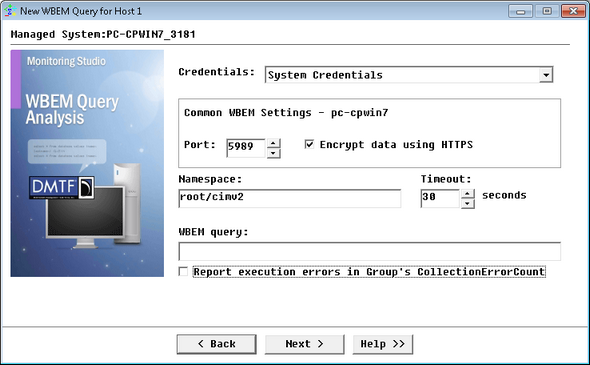
Executing WBEM Queries — Common WBEM Settings and WBEM Query Information
| 3. | Select the type of Credentials that you want to use for the WBEM query: |
| ▪ | Agent's Default Account: Uses the PATROL Agent credentials for monitoring the localhost. |
| ▪ | System Credentials (default): Uses the credentials previously specified when creating the Host. |
| ▪ | Add new credentials...: Lets you set new credentials for this specific query monitoring. |
| 4. | Set the Common WBEM Settings: |
| ▪ | Port: Enter the port number you wish to use for the connection. By default, in standard environments, the port 5988 is used for non-encrypted data, while port 5989 is used for encrypted data. |
| ▪ | Encrypt data using the HTTPS protocol: Select this option to encrypt the query with the HTTPS protocol. |
| 5. | Provide the following WBEM query Information: |
| ▪ | Namespace: Enter the WBEM namespace. A namespace is a logical group of related classes representing a specific technology or area of management (Example: root/cimv2) |
| ▪ | Timeout: Specify the time in seconds after which the query will be stopped (Default: 30 seconds). If the query times out, the Status parameter will be set to 2 (Failed) and an alarm will be triggered. |
| ▪ | WBEM query: Enter your WBEM query (Example: SELECT DeviceID,Speed,Description,PermanentAddress,OperationalStatus FROM HPUX_EthernetPort). |
| ▪ | Report execution errors in Group's CollectionErrorCount: Select this option to have the CollectionErrorCount parameter of the Group reflect possible alerts triggered upon the query execution. The CollectionErrorCount parameter of the Group reports on the collection errors of any Monitor, associated to the group, for which this option is available and selected, providing a global view of the collection errors for the whole Group. |
| 8. | Click Finish. The corresponding WBEM Query instance (WBEM Query: <Display Name>) is created in the PATROL Console. The collected parameters for WBEM Query instances are listed in the SEN_MS_WBEMQUERY chapter. |
You can now run String Searches, Extract Numeric Values and Value Map operations on the WBEM query result output.
|


