|
The Windows Performance Counter Monitor is designed to monitor any commercial Windows-based technology or any custom technology relying on a Windows-based middleware which is instrumented through Windows Performance Counters.
The Windows Performance Counter Monitor collects information about elements on your Windows systems and measures them. These elements can be processors, threads, processes, memory, etc., with each one having an associate set of counters and possibly instances. The data gathered by the Windows performances about specific components can be used to identify problems and bottlenecks within your technology and plan ahead for your future needs.
The Windows Performance Counter Monitor brings Windows performance data, important to the proper functioning of your technology, within your BMC framework and automatically notifies you when a value breaches a specific threshold.
To monitor a Windows performance counter
| 1. | In the PATROL Console, right-click the Host or Monitor Group icon and select KM Commands > New > Monitor... |
| 2. | Select Performance Counter from the drop-down list and click Next. |
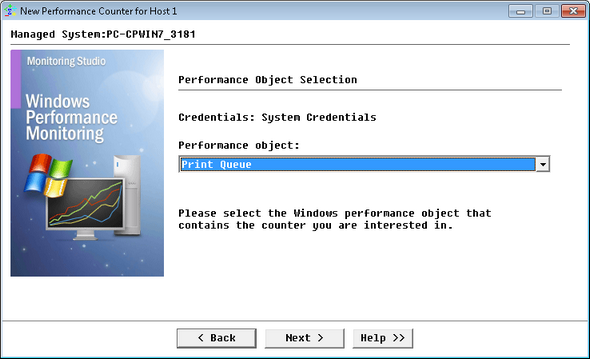
Monitoring Windows Performance — Performance Object Selection
| 3. | Select the Windows Performance Object that contains the counter and click Next. |
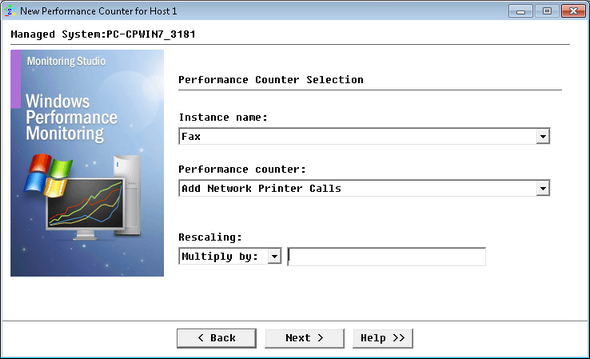
Monitoring Windows Performance — Performance Counter Selection
| 4. | Select the counter and instances: |
| ▪ | Instance name: Select the Windows Performance object to be monitored. |
| ▪ | Performance counter: Select the counter to be monitored. |
| ▪ | (Optional) Rescaling: A scale can be used to divide or multiply the Windows performance value by this number. To do so, enter the number you wish the value to be divided/multiplied by (Example: the committed memory is expressed in bytes, so, to obtain the value in mega-bytes (MB), type "1024" in the field for scale. By default, the scale value is 1 (no scale). |
| 7. | Click Finish. The corresponding Performance Counter instance (Performance Counter: <Display Name>) is created in the PATROL Console. The collected parameters for Performance Counter instances are listed in the SEN_MS_WINPERF chapter. |
|


