|
BPM Express for Hardware automatically detects the information sources available on the monitored computer and displays the hardware information provided by those sources in the Portal interface.
It is the Disks icon that regroups the icons created for each sensor found for logical disks, physical disks, and disk controllers. If the components are detected, the icons are created automatically. In the left pane, click on an Element > Hardware (<platform>) > Device Type > Disks and see the discovered components in detail in the right pane. An icon is created for each storage-related device discovered: physical disks, logical disks and disk controllers. Each icon is labeled with a description of the device: ID, size, vendor, role, etc. By clicking on the disk in the left pane, you can see its details in the right pane.
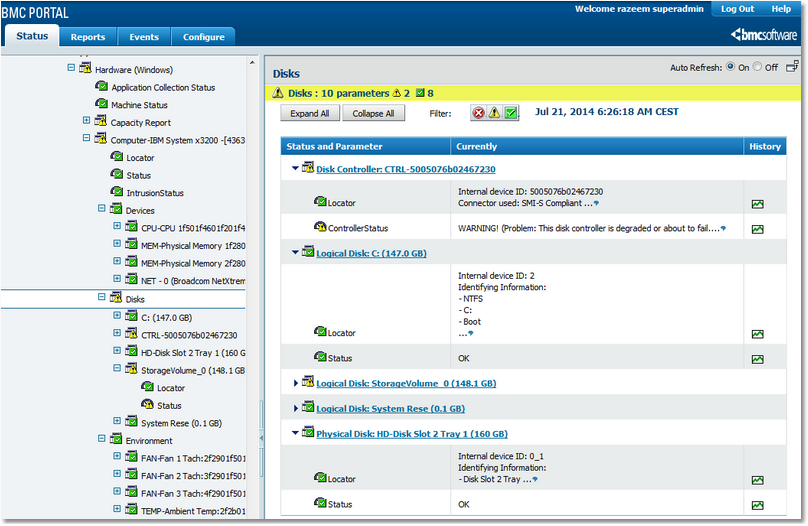
Monitoring disks: disk controller, physical disks, logical disks
 | An icon will be created for a disk controller only if its parameters discover some values. If not, then the disk controller details will be mentioned in the "Attached to" parameter of the logical/physical disk. |
Each of these disks also display which disk controller they are attached to. If a device appears to be missing, the Status parameter will trigger an alert. Status is a text parameter that describes the overall status of the corresponding device or sensor. It is the Status parameter that raises alerts when any of the other parameters for the device breach their thresholds. Alert conditions for Status describe in symbolic terms what occurs in the parameter when thresholds are breached: one exclamation mark triggers a warning; two exclamation marks raise an alarm.
Example
If BPM Express for Hardware detects that manufacturer-specified thresholds have been breached, the Status parameter will report, for example: “WARNING! This disk is about to fail” or, “ALARM!! This logical disk is no longer detected” or as may be the case. The history graph shows the exact details of the problem, its consequences and recommended actions.
|
Physical Disks
Physical disks must be monitored to avoid loss of data, unavailability and performance degradation. When available, the S.M.A.R.T. technology is used to warn of a disk failure before it occurs.
Depending on the available information, the following parameters will be displayed for each discovered physical disk:
●The Predicted Failure parameter uses the S.M.A.R.T. technology to predict physical disk failures. An alert will be triggered by the Status parameter if it is predicted that the Physical Disk will soon break down. ●The Error Count parameter is incremented each time an error occurs on this physical disk. An alert is raised by the Status parameter from the first detected error. The Status parameter represents the overall status of the physical disk and an alert is triggered if the physical disk is not available for proper operation or if any of the other parameters breach their thresholds. ●The Locator parameter helps to physically locate a component. ●The Status parameter represents the overall status of the physical disk. It triggers an alert if the physical disk is missing or not fully operational or if any of the other parameters have breached their thresholds. It is only Status that will trigger and display the alerts. When all is fine, Status shows “OK”, and when there is problem, it shows “WARNING!” or “ALARM!!” with a detailed description of the issue, its consequences and recommended actions. The alert conditions for Status are: “!”=WARNING; “!!”=ALARM. Example: “OK” or “ALARM!! This physical disk is no longer detected." | The "Status" parameter reports an “ALARM!!” if the "Error Count" parameter is greater than zero (that is: the disk encountered some errors). Since the counter is reset every 24th hour, the corresponding alert on the Status parameter will automatically be cleared after 24 hours. This mechanism enables BPM Express for Hardware/Portal to report pure event-driven alerts with no need for manual acknowledgment from the operators. |
Logical Disks
RAID or advanced disk controllers expose several physical disks as a single logical disk to the operating system. The status of a logical disk typically corresponds to the status of a RAID array (on-line, degraded, rebuilding, etc.). For each logical disk discovered, the parameters displayed are:
●The Error Count parameter represents number of errors encountered by the Logical disk since the last counter reset. The error count is automatically reset every 24th hour (by default; this setting is configurable). ●The Status parameter represents the overall status of the logical disk. It triggers an alert if the logical disk is missing or if any of the other parameters have breached their thresholds. It is only Status that will trigger and display the alerts. When all is fine, Status shows “OK”, and when there is problem, it shows “WARNING!” or “ALARM!!” with a detailed description of the issue, its consequences and recommended actions. The alert conditions for Status are: “!”=WARNING; “!!”=ALARM. Example: “OK” or “ALARM!! This logical disk is no longer detected." ●The Locator parameter helps to physically locate a component.  | For non-RAID disk controllers (as most of IDE controllers, for example), no logical disk will be displayed. |
| The "Status" parameter reports an “ALARM!!” if the Error Count parameter is greater than zero (that is: the disk encountered some errors). Since the counter is reset every 24th hour, the corresponding alert on the Status parameter will automatically be cleared after 24 hours. This mechanism enables BPM Express for Hardware/Portal to report pure event-driven alerts with no need for manual acknowledgment from the operators. |
Disk Controller
A disk controller is a card inside a computer that connects one or several physical disk drives to this computer. Some intelligent disk controllers (such as RAID controllers) manage several physical disks as a single logical disk which is the only disk exposed to the operating system. Monitoring both physical and logical disks is essential to ensure that storage is available.
Depending on the system and the information available, the Battery Status, the Controller Status and the Locator parameters are displayed.
●The Battery Status parameter triggers an alert to predict that the disk controller battery will be unable to support the controller in the event of a power failure. ●The Controller Status parameter displays the status of the disk controller. ●The Locator parameter helps to physically locate a component. The disk controller icon is displayed only if either/both of the parameters collect some values. If no values are collected, there will be no separate icon for the disk controller, but the logical disk and physical disk instances display the details of the disk controller the disks are attached to.
| All systems may not be able to provide this information. |
Related Topics
Modifying Parameters Thresholds
Physical Disk
Logical Disk
Disk Controller
| 

