|
Many devices use SNMP to report their health and operations. They often use SNMP traps to notify failures but the best case is when they embed a true SNMP agent and a documented MIB which specifies the meaning of each SNMP OID. Polling SNMP agents is a good method to ensure that your device is operating properly.
The SNMP Monitor is designed to poll the SNMP agent and retrieve the values of a given OID (object identifier), or the values of an SNMP table, thereby enabling you to be notified when a problem occurs or just be informed of the status of the monitored device/attribute.
 SNMP polling supports SNMP v1, v2c, and v3. SNMP polling supports SNMP v1, v2c, and v3.
To monitor an SNMP agent
| 1. | Access the Monitoring Studio Configuration panel, as explained in the Configure Monitors chapter. |
| 2. | In the Monitors section, click the SNMP button. The SNMP panel is displayed. |
| 3. | Define the SNMP Information: |
| ▪ | Select the version of the SNMP protocol used by the device to be monitored. Possible values are 1, 2c, or 3. |
| ▪ | Use the spin button to indicate the SNMP port number you wish to use to perform SNMP queries. By default the SNMP queries are performed through port 161. |
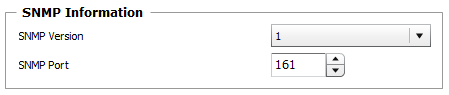
Using the SNMP Protocol - SNMP Information
| 4. | If you selected SNMP Version 1, indicate the SNMP Community string to use to perform SNMP v1 queries: |

Using the SNMP Protocol - SNMP v1 Connection Settings
The timeout used in SNMP v1 is the one configured through the PATROL Agent Configuration variable /snmp/default_timeout.
| 5. | If you selected SNMP Version 2c, indicate: |
| ▪ | the SNMP Community string to use to perform SNMP v2c queries. |
| ▪ | the number of seconds Monitoring Studio will wait for the completion of the SNMP polling (default: 120 seconds). This timeout must be long enough to complete the polling of an entire SNMP table. |
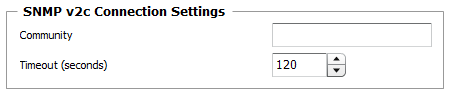
Using the SNMP Protocol - SNMP v2c Connection Settings
| 6. | If you selected SNMP Version 3, indicate: |
| ▪ | the Username to be used to perform the SNMP v3 queries. |
| ▪ | the Authentication Protocol to be used to authenticate the SNMP v3 messages. Possible values are: None, MD5, SHA. |
| ▪ | the Authentication password to be used to authenticate the SNMP v3 messages. |
| ▪ | the Privacy protocol to be used to encrypt SNMP v3 messages. Possible values are: None, AES, DES. |
| ▪ | the Privacy password associated with the privacy protocol. |
| ▪ | the Context name accessible to the SNMP entity. |
| ▪ | the number of seconds Monitoring Studio will wait for the completion of the SNMP polling (default: 120 seconds). This timeout must be long enough to complete the polling of an entire SNMP table. |
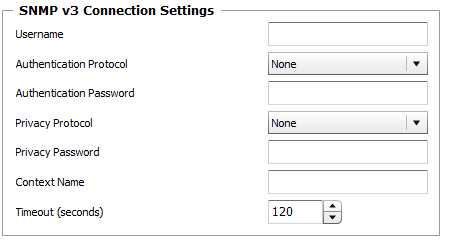
Using the SNMP Protocol - SNMP v3 Connection Settings

Polling SNMP Agents — Configuration Panel
 SNMP trap listening only supports SNMP version 1. SNMP v2c and v3 traps are not supported. SNMP trap listening only supports SNMP version 1. SNMP v2c and v3 traps are not supported.
| 8. | Click Close to validate. |
|


