To poll SNMP agents from a single OID (numeric)
| 1. | The Single OID (Numeric) panel allows you to configure the polling of SNMP Agents from one OID (Numeric): |
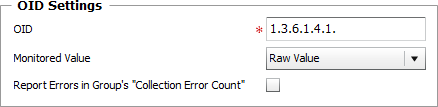
Polling SNMP Agents — Configure the OID (Numeric) settings
| 2. | OID: Enter the OID (object identifier) to poll, as provided by the Management Information Base (MIB) |
| 3. | Monitored Value: Select the value you wish Monitoring Studio to collect: |
| ▪ | Raw Value: Reports on the actual value collected upon data polling. |
| ▪ | Delta: Reports on the difference between values collected during two consecutive polling. |
| ▪ | Delta per second/minute/hour: Reports on the value resulting of the division of the Delta value by the number of seconds/minutes/hour elapsed between the collection times. |
| 4. | Report Errors in Group's "Collection Error Count": Select this option to have the Collection Error Count attribute of the Group Monitor reflect possible alerts triggered upon the SNMP monitoring execution. The Collection Error Count attribute of the Group reports on the collection errors of all Monitors, associated to the Group, for which this option is available and selected, providing a global view of the collection errors for the whole Group. |
| 5. | Define the Monitor Settings: |
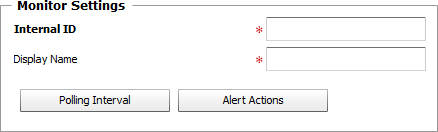
Polling SNMP Agents — Monitor Settings
| ▪ | Internal ID: Enter an ID to identify the managed SNMP Agent in TrueSight Operations Management. |
| ▪ | Display Name: Enter a name to identify the managed SNMP Agent in TrueSight Operations Management. |
| ▪ | Optional — Polling Interval: Set the frequency at which the data collection will be performed. Default is 2 minutes. |
| ▪ | Optional — Alert Actions: Define the action(s) Monitoring Studio needs to perform when the thresholds for this managed SNMP Agent is breached. |
| 6. | Click the Add to List button to complete the creation of the SNMP Single OID (Numeric) instance. |
|


