|
By default, Monitoring Studio KM for PATROL automatically determines which mechanism (Tuning or Event Management) is best suited to the managed system when it first runs. This threshold mechanism selection can however be modified later on through the Thresholds Mechanism Selection KM Command:
| 1. | Right-click the main Monitoring Studio icon > KM Commands > KM Settings > Thresholds Mechanism Selection... |
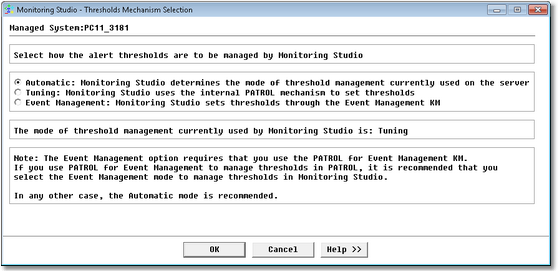
Threshold Mechanism Selection — Default option
| 2. | Select one of the following options: |
| • | Automatic (Recommended): Monitoring Studio automatically detects the way thresholds are managed by the PATROL Agent and uses the most relevant mode (Tuning or Event Management). |
| • | Tuning: Monitoring Studio manages its thresholds through the standard internal PATROL mechanism (Override parameters). Thresholds are stored in the PATROL Agent configuration under the /___tuning___ tree. |
| • | Event Management: Monitoring Studio manages its thresholds through the Event Management mechanism. Thresholds are stored in the PATROL Agent configuration under the /AS tree. This option requires that you set up the PATROL for Event Management KM on your PATROL Agent. PATROL for Event Management has to be enabled and preloaded. |
 In order to avoid side effects and unpredictable behavior, if you change the thresholds management option, Monitoring Studio will automatically migrate the thresholds set through the previous method to the new method (only for its monitored objects). In order to avoid side effects and unpredictable behavior, if you change the thresholds management option, Monitoring Studio will automatically migrate the thresholds set through the previous method to the new method (only for its monitored objects).
| 

