|
The SNMP Trap Listening tool monitors and listens for SNMP traps and enables rapid recovery actions depending on the traps received, thereby ensuring optimal functioning of applications or devices that send SNMP traps.
SNMP Trap listening objects are instances of the SW_SNMP_TRAPS class.
 The SNMP Agent emitting the traps should be configured to send them to the PATROL Agent where Monitoring Studio is installed and running. If the SNMP agent is not properly configured, Monitoring Studio will not receive any SNMP trap. The SNMP Agent emitting the traps should be configured to send them to the PATROL Agent where Monitoring Studio is installed and running. If the SNMP agent is not properly configured, Monitoring Studio will not receive any SNMP trap.
Creating an SNMP Trap Listening
| 1. | In the PATROL Console, right-click the Monitored Application icon and select KM Commands > New > SNMP Trap listening... |
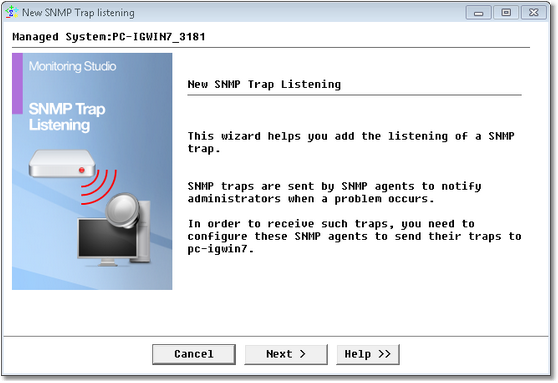
SNMP Trap Listening Wizard — Welcome Page
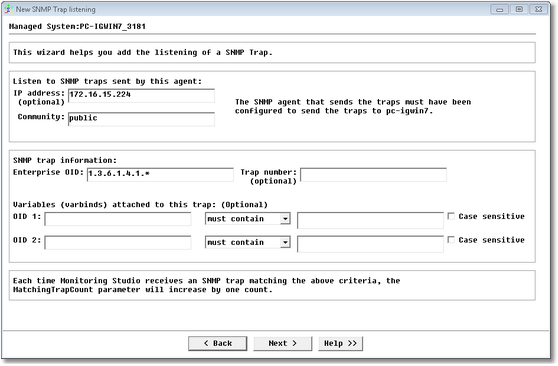
SNMP Trap Listening Wizard — Agent identification Page
| 3. | Identify the agent and traps to listen to: |
| ▪ | IP address (optional): IP address of the computer or device where the SNMP agent is running and that will send the SNMP traps. Leave this field empty to listen to SNMP traps from any computer or device. |
| ▪ | Community: Enter the name of the community string used by the SNMP agent. |
| ▪ | Enterprise OID: Enterprise OID of the SNMP Trap. You may use wildcards. |
| ▪ | Trap number (optional): Trap number contained in the SNMP Trap. |
| ▪ | OID 1 & 2 (optional): First and second attached variables OID that should be contained within the SNMP trap. You can also enter the text that should be found (or not) within the OID content. |
| ▪ | Case sensitive: Indicates whether or not the search will be case sensitive. |
All these pieces of information define the SNMP Trap that is expected. Monitoring Studio will react to the SNMP Trap received only if this information is found within the SNMP Trap. All other SNMP Traps will be ignored.
 If you are unsure about the characteristics of the SNMP trap you want to detect, you will need to use a SNMP MIB Browser tool to understand the exact meaning of each trap. You can also use the Monitoring Studio built-in SNMP trap listener tool to view in real-time the SNMP traps and their characteristics that are received by the PATROL Agent. Right-click on the main Monitoring Studio icon > KM commands > Tools > Real-time SNMP Trap Listener. If you are unsure about the characteristics of the SNMP trap you want to detect, you will need to use a SNMP MIB Browser tool to understand the exact meaning of each trap. You can also use the Monitoring Studio built-in SNMP trap listener tool to view in real-time the SNMP traps and their characteristics that are received by the PATROL Agent. Right-click on the main Monitoring Studio icon > KM commands > Tools > Real-time SNMP Trap Listener.
The SNMP trap listening port is actually a PATROL Agent configuration variable: /snmp/trap_port=162.You can set this variable to whatever port you want Monitoring Studio to listen on.
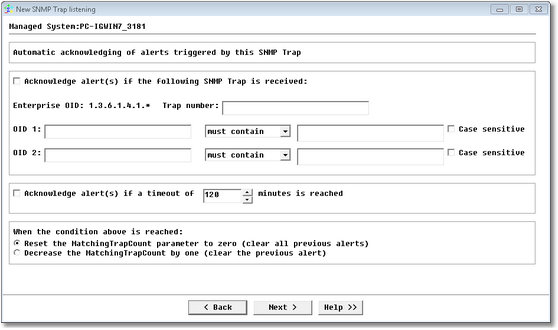
SNMP Trap Listening Wizard — Automatic Acknowledgement Page
| 5. | Set the automatic acknowledgement: |
| ▪ | Acknowledge alert(s) if the following SNMP Trap is received: Check this box if you wish to acknowledge an alert when the SNMP trap received matches the criteria set. |
| ▪ | Trap number: Enter the trap number that will acknowledge the alerts triggered by the specified trap. |
| ▪ | OID1 & 2: First and second attached variables OID that should be contained within the SNMP trap to acknowledge a matching trap received. |
| ▪ | Acknowledge alert(s) if the following timeout is reached: Check this box if you wish to acknowledge a matching SNMP trap after a certain period of time. |
| ▪ | Timeout value: Time, in minutes, after which the matching SNMP Trap received, will be acknowledged. This value is only applicable if you have checked the "Acknowledge alert(s) if the following timeout is reached" box. |
| ▪ | Choose the action to be taken when the condition above is reached: Reset the MatchingTrapCount parameter to zero, i.e. clear all previous alerts or Decrease the MatchingTrapCount by one; i.e. clear the previous alert. |
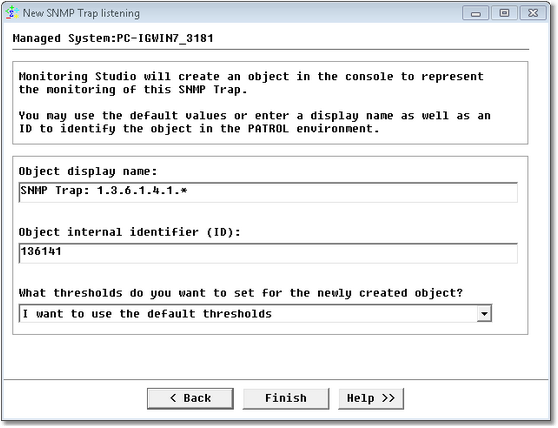
SNMP Trap Listening Wizard — Settings Page
See Also
SNMP Browser tool
SNMP Trap Listener tool
SW_SNMP_TRAPS
Although SNMP Trap listening seems to work, no trap matches my criteria
| 

