Setting connection to Other Databases (ODBC only)

Home  Previous  Next

This section details the various connection settings available for performing queries on database servers other than MS SQL, MySQL, Oracle, or PostgreSQL. First steps are common to all database queries and connection methods. They are documented in the Database Query Analysis section.

Step 5.1d - Setting Command line connection to Other database servers (ODBC only)

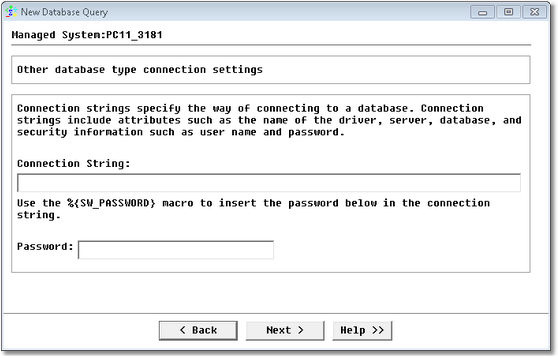
Connection settings for databases other than MS SQL, MySQL or Oracle is only supported through ODBC connection. You can set the connection parameters with the following panel:

WIZ_DatabaseQuery_8OtherSettings

Database Query Analysis Wizard — Other (ODBC only) connection settings Page

Connection String: Enter the connection string that includes attributes such as the name of the driver, server, database and security information (user name and password).
In computing, a connection string is a string that specifies information about a data source and the means of connecting to it. It is passed in code to an underlying driver or provider in order to initiate the connection.
Password: Passwords are sensitive information that should not be displayed without being encrypted. When a password is included in the string you need to execute, you must use the %{PASSWORD} macro in the string and enter the corresponding password in the Password field (encrypted display).

Example

String = Driver={MySQL ODBC 3.51 Driver};Server=myserver;Database=mydatabase;User=user;Password=%{SW_PASSWORD};Option=3;
Password = *********

Click Next to open the query definition panel.