|
This section details the various connection settings available for performing queries on Postgre SQL database server. First steps are common to all database queries and connection methods. They are documented in the Database Query Analysis section.
Step 5.1e - Setting Command line connection to PostgreSQL database servers
If you have selected Command Line Utility as the connection method, the following panel is displayed:
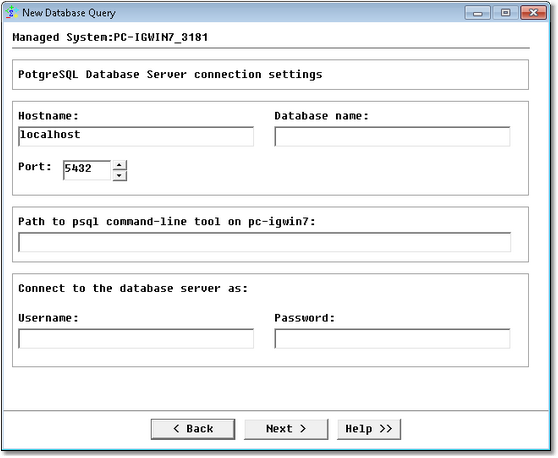
Database Query Analysis Wizard — Microsoft SQL Server Command Line Connection Settings
| • | Hostname: Name of the server where PostgreSQL is running (hostname or IP address) |
| • | Database name: Name of the database |
| • | Port: PostgreSQL port number |
| • | Path to psql command-line tool: Path to the psql command-line tool |
| • | Username: Account used to connect to the database |
| • | Password: Password associated with the specified username |
Click Next to access the query definition panel.
Step 5.2e - Setting JDBC connection to Postgre SQL database servers
If you have selected Java Database Connectivity (JDBC) as the connection method, the following panel is displayed:
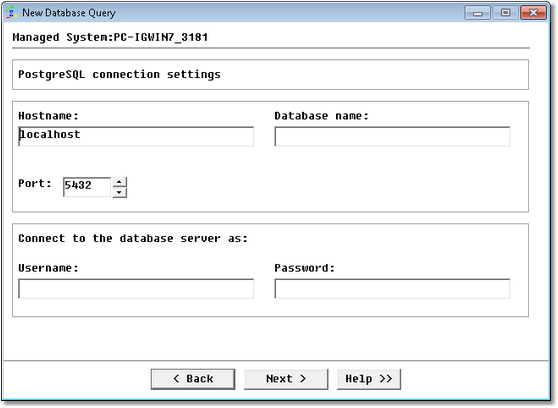
Database Query Analysis Wizard — MS SQL Server JDBC Connection Settings
| • | Hostname: Name of the server where PostgreSQL is running (hostname or IP address) |
| • | Database name: Name of the database |
| • | Port: PostgreSQL port number |
| • | Username: Account used to connect to the database |
| • | Password: Password associated with the specified username |
Click Next to access the query definition panel.
| 

