|
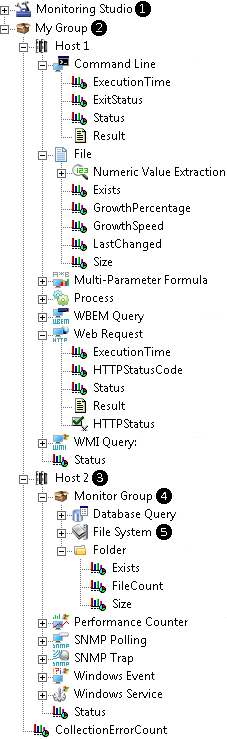 The architecture of Monitoring Studio KM for PATROL has been designed in a logical manner to help you easily and intuitively manage all your technologies (application, server, device, etc.) and to reflect as accurately as possible the genuine hierarchy of the environment you want to monitor. The Monitoring Studio hierarchy has been established as follows: The architecture of Monitoring Studio KM for PATROL has been designed in a logical manner to help you easily and intuitively manage all your technologies (application, server, device, etc.) and to reflect as accurately as possible the genuine hierarchy of the environment you want to monitor. The Monitoring Studio hierarchy has been established as follows:
 ❶ Monitoring Studio ❶ Monitoring Studio
The Monitoring Studio instance (SEN_MS_MAIN) is at the highest level of the hierarchy. It appears once the KM has been installed on a PATROL Agent and is loaded in a BMC PATROL Console. It is the starting point of the Monitoring Studio configuration. Groups are created from this instance.
 ❷ Group ❷ Group
A Group instance (SEN_MS_GROUP) is the main container which corresponds to the technology you need to monitor (application, server, device, etc.). Groups are displayed at the same level as the Monitoring Studio instance and contain one or several Hosts.
 ❸ Host ❸ Host
A Host instance (SEN_MS_HOST) includes information about the target server where the technology is running (hostname, system type, credentials list, SNMP information and host availability check information, etc.). Hosts are arranged under the Group instance and contain either Monitor Groups or Monitors.
❹ Monitor Group
A Monitor Group instance (SEN_MS_MONITORGROUP) is an optional container that you can use to group monitors. Monitor Groups are created under a Host and contain Monitors.
 ❺ Monitor ❺ Monitor
Monitor instances are at the lowest level of the hierarchy and corresponds to the diverse monitoring tools available in Monitoring Studio. Monitors are either grouped directly under a Host or under a Monitor Group. They can also be referred to as "monitored objects".
Here is the complete list of Monitors:
| 


 Command Line (SEN_MS_COMMANDLINE)
 Database Query (SEN_MS_DBQUERY)
 File (SEN_MS_FILE)
 File System (SEN_MS_FILESYSTEM)
 Folder (SEN_MS_FOLDER)
 Multi-Parameter Formula (SEN_MS_FORMULA)
 Nagios Performance Data (SEN_MS_NAGIOSPERF)
 Nagios Plugin (SEN_MS_NAGIOSPLUGIN)
 Performance Counter (SEN_MS_WINPERF)
 Process (SEN_MS_PROCESS)
 PSL Command (SEN_MS_PSLCOMMAND)
 SNMP Polling (SEN_MS_SNMPPOLLING)
 SNMP Trap (SEN_MS_SNMPTRAP)
 WBEM Query (SEN_MS_WBEMQUERY)
 Web Request (SEN_MS_WEBREQUEST)
 Windows Event (SEN_MS_WINEVENT)
 Windows Service (SEN_MS_WINSERVICE)
 WMI Query (SEN_MS_WMIQUERY)
 Text Pre-Processing (SEN_MS_TRANSFORM)
 String Search (SEN_MS_STRING)
 Numeric Value Extraction (SEN_MS_NUMBER)
 Value Map (SEN_MS_VALUEMAP)
 Dynamic Instances (SEN_MS_DYNAMIC)