|
This section details the various connection settings available for performing queries on database servers other than MS SQL, MySQL, Oracle or PostgreSQL.
To configure a connection to any other database server
| 1. | In the PATROL Console, right-click the Host or Monitor Group icon and select KM Commands > New > Monitor... |
| 2. | Select Database Query: Other (JDBC) from the drop-down list and click Next. |
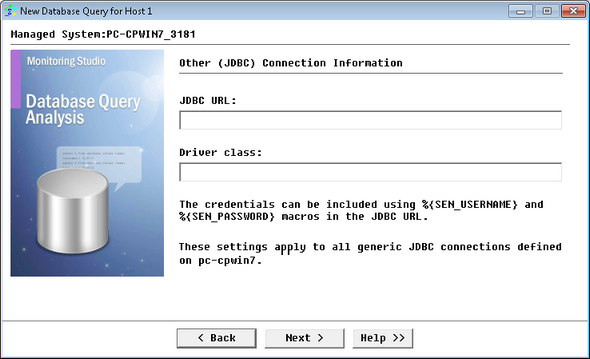
Performing a Query on an Other Database - Other (JDBC) Connection Information
| 3. | Specify the Connection Information: |
| ▪ | JDBC URL: Enter the URL to use for connecting to the JDBC database. You can use the %{SEN_USERNAME}, %{SEN_PASSWORD} and %{SEN_PASSWORD} macros to insert the username and password (Example: jdbc:postgresql://hostname:5432/dbname). |
| ▪ | Driver class: Enter the driver class for the JDBC database (Example: org.postgresql.Driver). |
 These settings apply to all Other (JDBC) connections defined on the host. These settings apply to all Other (JDBC) connections defined on the host.
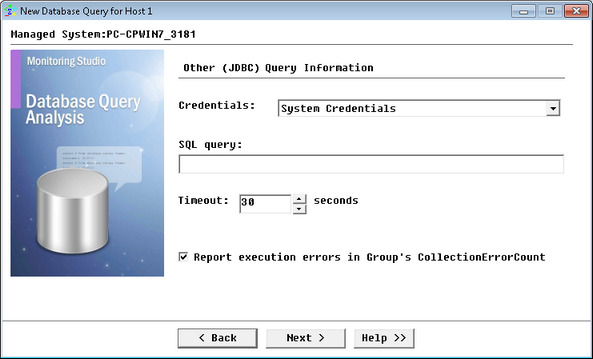
Performing a Query on an Other Database - Other (JDBC) Query Information
| 5. | Define the Query Information to the Other (JDBC) database server: |
| • | Credentials: Select the credentials that you want to use: |
| • | System Credentials (default): Uses the credentials previously specified when creating the Host. |
| • | Add new credentials...: Lets you set new specific credentials. |
| • | SQL Query: Enter the SQL query you wish to perform. |
| • | Timeout: Specify the time in seconds after which the query will be stopped (Default: 30 seconds). If the query times out, the Status parameter will be set to 2 (Failed) and an alarm will be triggered. |
| • | Report execution errors in Group's CollectionErrorCount: Select this option to have the CollectionErrorCount parameter of the Group reflect possible alerts triggered upon the query execution. The CollectionErrorCount parameter of the Group reports on the collection errors of any Monitor associated to the group, for which this option is available and selected, providing a global view of the collection errors for the whole Group. |
| 8. | Click Finish. The corresponding Database Query instance (Database Query: <Display Name>) is created in the PATROL Console. The collected parameters for Database Query Monitors are listed in the SEN_MS_DBQUERY chapter. |
|


