Executing WMI Queries


Executing WMI Queries |
|
|
WMI (Windows Management Instrumentation) is the Microsoft implementation of WBEM (Web Based Enterprise Management) that provides users with information about the status of local or remote computer systems. TrueSight Operations Management - Monitoring Studio can execute WMI queries on your system and consolidate them within your TrueSight Operations Management environment. It can also query the WMI repository for monitor type and instance information. You can for example request the WMI that returns all the objects representing shut-down events from your desktop system.
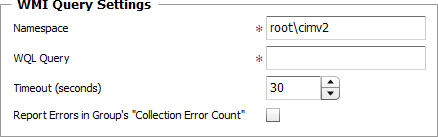
To analyze a WMI query
WMI Query — Settings
Basic WMI Queries
|
Keyword |
Example code |
Description |
SELECT |
SELECT * |
Specifies what properties are returned. Typically * is used to simply retrieve all. |
FROM |
FROM __InstanceCreationEvent |
Specifies the event class to query. This will be the extrinsic or intrinsic event class. |
WHERE |
WHERE TargetInstance ISA 'Win32_Process' AND TargetInstance.Name = 'notepad.exe' |
Filters the results. For intrinsic events, it will usually include the ISA keyword to specify the class of the TargetInstance. Note: WMI queries support dot characters in the WHERE statement. |
| 5. | Define the Monitor Settings: |
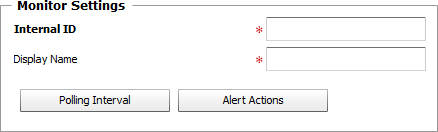
WMI Query — Monitor Settings
| ▪ | Internal ID: Enter an ID to identify the managed WMI query instance in TrueSight Operations Management. |
| ▪ | Display Name: Enter a name to identify the managed WMI query instance in TrueSight Operations Management. |
| ▪ | Optional — Polling Interval: Set the frequency at which the data collection will be performed. Default is 2 minutes. |
| ▪ | Optional — Alert Actions: Define the action(s) Monitoring Studio needs to perform when the thresholds for this WMI query instance is breached. |
| 6. | Optional — Define the Content Processing rules you wish to apply to the WMI query output: |

WMI Query — Content Processing
| ▪ | String Searches: Define the search criteria for a specific string you wish to find or not find in the WMI query output. |
| ▪ | Numeric Extractions: Define any numeric value to be extracted from the WMI query output. |
| 7. | Click the Add to List button to complete the creation of the WMI query instance. |
| 8. | Click Close. |