Parsing an XML Log File

Home  Previous  Next

Most technologies use log files to trace their operations and notify operators when failures occur. These log files contain crucial information about the hardware, software, or system problems that may arise in your IT environment.

In this section, we will examine one of the many existing log file formats: the XML log file. The XML log file format makes the extraction of data way easier as this data is saved in a structured format: each log entry includes a date/time, the name of the logger, and many other useful elements.

Monitoring Studio can help you parse any XML Log file to monitor its properties and get notified every time a severe issue occurs.

1.Specifying the file to monitor
2.Pre-processing the content of the file (converting XML to CSV)
3.Searching for strings in the result of the XML-to-CSV pre-processing

Specifying the file to monitor

1.In the PATROL Console, right-click the Host or Monitor Group icon and select KM Commands > New > Monitor...
2.Select File from the drop-down list and click Next.
3.Specify that this file is a Log file , i.e. that Monitoring Studio needs to monitor only the new lines that are being added to the file.
4.Specify the path to the file. You can use wildcards (* and ?) if the name of the file changes over time (like a time-stamped Log file). In such case, Monitoring Studio monitors the most recently updated file which matches with the specified path.
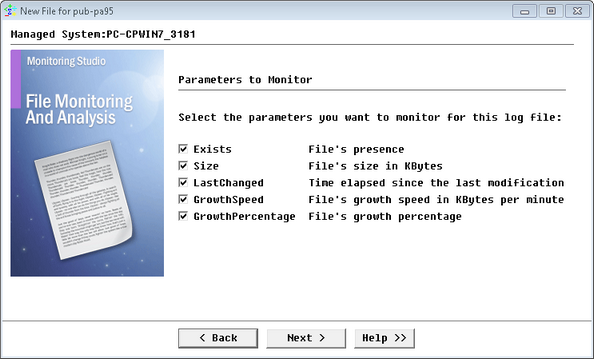
5.Select the parameters you want to monitor (in our example: Exists, Size, LastChanged, GrowthSpeed, and GrowthPercentage). See SEN_MS_FILE for parameter details.

Parsing an XML Log File_usecase_selecting_parameters

Selecting the Parameters to Monitor

6.Configure the Monitor settings if you wish to change the label, the PATROL ID, or the thresholds for some parameters of the instance. In our example, we changed the label to MySQL Server.

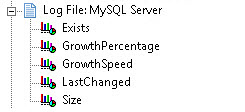
You have successfully setup the monitoring of an XML log file. The corresponding "MySQL Server" log file icon has now been created and is displayed in the PATROL console.

EX_TextPreProcess_3TreeView

Specifying the file to monitor

Now to parse this file, you need to pre-process the XML text (in order to later be able to run String Searches or perform Numeric Value Extraction on the result) and thus be notified when failures occur.

Pre-processing the content of the file (converting XML to CSV)

Since you are dealing with an XML output, the content needs to be processed to extract individual objects and their properties.

1.In the PATROL Console, right-click the Log File: MySQL Server icon and select KM Commands > New > Text Pre-Processing...
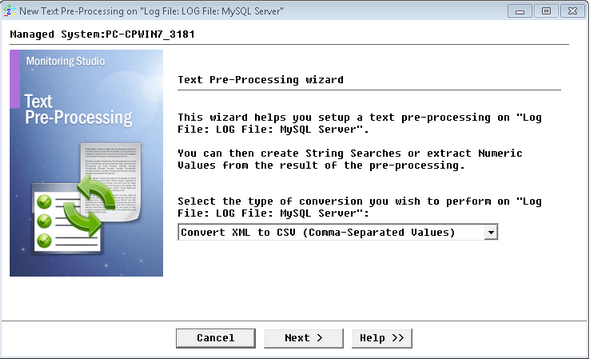
2.Select the Convert XML to CSV (Comma-Separated Values) option and click Next.

EX_TextPreProcess_1Welcome

Selecting a Type of Conversion to Apply to a Log File

In this example, the records in this XML Log file are provided in the following format:

<rec>

<vm>su37sr72</vm>

<ts>2003-09-22 11:47:35.511 CEST</ts>

<level>ERROR</level>

<class></class>

<method></method>

<ctx>

<pid>A141607</pid>

<appid>frontnet</appid>

<cname>User_3_0.getDefaultUserRole</cname>

<reqid>2</reqid>

<sesid>1uEPHTdRG2mM6GCfhv1EkwcBrCi68ffGizgIEtGHWFMt5Hc7lwE7!-1625978434!-1455528670!7501!7502!1064223951289</sesid>

<thrid>ExecuteThread: '68' for queue: 'default'-f7c8b25c01</thrid>

<cthid>ExecuteThread: '68' for queue: 'default'-f7c8b1696c</cthid>

</ctx>

<msg>

<![CDATA[FNNotAuthorizedException;FEA002002;No authorization to execute service operation]]>

</msg>

<exc>

<ts>2003-09-22 11:47:35.509 CEST</ts>

<sev>ERROR</sev>

<ctx>

<pid>A141607</pid>

<appid>frontnet</appid>

<cname>User_3_0.getDefaultUserRole</cname>

<reqid>2</reqid>

<sesid>1uEPHTdRG2mM6GCfhv1EkwcBrCi68ffGizgIEtGHWFMt5Hc7lwE7!-1625978434!-1455528670!7501!7502!1064223951289</sesid>

<thrid>ExecuteThread: '68' for queue: 'default'-f7c8b25c01</thrid>

<cthid>ExecuteThread: '68' for queue: 'default'-f7c8b1696c</cthid>

</ctx>

<stack>

<![CDATA[com.csg.pb.frontnet.exec_arch.calx.FNNotAuthorizedException: No authorization to

execute service operation

at

com.csg.pb.frontnet.services.user_3_0.bean.UserBean_3_0.getDefaultUserRole(UserBean_3_0.

java:345)

at

com.csg.pb.frontnet.services.user_3_0.bean.UserBean_3_0_3c05dc_EOImpl.getDefaultUserRol

e(UserBean_3_0_3c05dc_EOImpl.java:145)

at

com.csg.pb.frontnet.services.user_3_0.bean.UserBean_3_0_3c05dc_EOImpl_WLSkel.invoke(Un

known Source)

at weblogic.rmi.internal.BasicServerRef.invoke(BasicServerRef.java:360)

at weblogic.rmi.cluster.ReplicaAwareServerRef.invoke(ReplicaAwareServerRef.java:93)

at weblogic.rmi.internal.BasicServerRef.handleRequest(BasicServerRef.java:329)

at weblogic.rmi.internal.BasicServerRef.dispatch(BasicServerRef.java:178)

at weblogic.rmi.internal.ServerRequest.sendOneWayRaw(ServerRequest.java:92)

at weblogic.rmi.internal.ServerRequest.sendReceive(ServerRequest.java:112)

at weblogic.rmi.cluster.ReplicaAwareRemoteRef.invoke(ReplicaAwareRemoteRef.java:263)

at weblogic.rmi.cluster.ReplicaAwareRemoteRef.invoke(ReplicaAwareRemoteRef.java:230)

at weblogic.rmi.internal.ProxyStub.invoke(ProxyStub.java:35)

at $Proxy1401.getDefaultUserRole(Unknown Source)

at

com.csg.pb.frontnet.services.user_3_0.bean.UserCA_3_0.getDefaultUserRole(UserCA_3_0.java:

244)

at

com.csg.pb.frontnet.apps.common.brokers.FnUserBroker.getDefaultPortalUserSettings(FnUse

rBroker.java:56)

at

com.csg.pb.frontnet.apps.common.brokers.FnUserBroker.getDefaultMandant(FnUserBroker.ja

va:280)

at

com.csg.pb.frontnet.apps.common.base.DefaultAuthorizationStrategy.resetBusinessUnitPara

m(DefaultAuthorizationStrategy.java:72)

at

com.csg.pb.frontnet.apps.common.base.DefaultAuthorizationStrategy.assertAvailableBusines

sUnit(DefaultAuthorizationStrategy.java:48)

at

com.csg.pb.frontnet.apps.common.base.AuthorizationServlet.doGetManaged(AuthorizationSe

rvlet.java:99)

at com.csg.cs.servlet.CSServlet.doGet(CSServlet.java:82)

at javax.servlet.http.HttpServlet.service(HttpServlet.java:740)

at com.csg.cs.servlet.CSServlet.service(CSServlet.java:459)

at com.csg.pb.frontnet.util.servlet.FNServlet.service(FNServlet.java:334)

at com.csg.pb.frontnet.apps.common.base.CommonServlet.service(CommonServlet.java:66)

at javax.servlet.http.HttpServlet.service(HttpServlet.java:853)

at weblogic.servlet.internal.ServletStubImpl.invokeServlet(ServletStubImpl.java:262)

at weblogic.servlet.internal.TailFilter.doFilter(TailFilter.java:21)

at weblogic.servlet.internal.FilterChainImpl.doFilter(FilterChainImpl.java:27)

at com.csg.cs.security.wls.enforce.IntranetPLEnfFilter.doFilter(IntranetPLEnfFilter.java:174)

at weblogic.servlet.internal.FilterChainImpl.doFilter(FilterChainImpl.java:27)

at weblogic.servlet.internal.RequestDispatcherImpl.forward(RequestDispatcherImpl.java:287)

at

com.csg.pb.frontnet.apps.common.util.RequestForwarder.forward(RequestForwarder.java:48)

at

com.csg.pb.frontnet.apps.portals.base.PortalSelectionController.processSelectionPage(Portal

SelectionController.java:49)

at

com.csg.pb.frontnet.apps.portals.base.PortalSelectionController.doGetManaged(PortalSelecti

onController.java:29)

at com.csg.cs.servlet.CSServlet.doGet(CSServlet.java:82)

at javax.servlet.http.HttpServlet.service(HttpServlet.java:740)

at com.csg.cs.servlet.CSServlet.service(CSServlet.java:459)

at com.csg.pb.frontnet.util.servlet.FNServlet.service(FNServlet.java:334)

at javax.servlet.http.HttpServlet.service(HttpServlet.java:853)

at weblogic.servlet.internal.ServletStubImpl.invokeServlet(ServletStubImpl.java:262)

at weblogic.servlet.internal.TailFilter.doFilter(TailFilter.java:21)

at weblogic.servlet.internal.FilterChainImpl.doFilter(FilterChainImpl.java:27)

at com.csg.cs.security.wls.enforce.IntranetPLEnfFilter.doFilter(IntranetPLEnfFilter.java:174)

at weblogic.servlet.internal.FilterChainImpl.doFilter(FilterChainImpl.java:27)

at

weblogic.servlet.internal.WebAppServletContext.invokeServlet(WebAppServletContext.java:

2684)

at weblogic.servlet.internal.ServletRequestImpl.execute(ServletRequestImpl.java:2412)

at weblogic.kernel.ExecuteThread.execute(ExecuteThread.java:140)

at weblogic.kernel.ExecuteThread.run(ExecuteThread.java:121)

]]>

</stack>

</exc>

</rec>

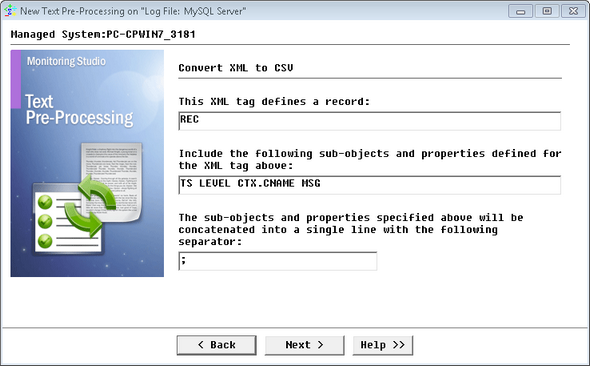
The XML tag identifying each new record is <REC>. Let’s say that you would like to retrieve the <TS> value, the <LEVEL> value, the <CNAME> value under <CTX> and the <MSG> value as they are likely to provide additional information when a problem occurs.

Therefore, you need to specify that REC is the XML tag for a new record and that you want to include the value for the following properties and sub-tags:TS LEVEL CTX.CNAME MSG. Please note the syntax "CTX.CNAME" which means the value of CNAME under the CTX tag.

EX_TextPreProcess_2Param

Defining the Conversion Parameters

Then, you need to specify a label and an ID for the text pre-processing object that will be created under the Log File icon (xml2Csv, for example).

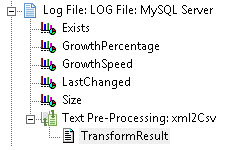
As a result, a new icon representing the XML-to-CSV pre-processing (xml2Csv) is created and displayed in the Log File tree view of the PATROL Console:

EX_TextPreProcess_4TreeView

Accessing the TransformResult File

This object has a single TransformResult text parameter as a result of the XML to CSV pre-processing:

2003-09-22 11:47:35.511 CEST;ERROR;User_3_0.getDefaultUserRole; FNNotAuthorizedException;FEA002002;No authorization to execute service operation]]>;

2003-09-22 11:52:05.984 CEST;ERROR;User_3_0.getDefaultUserRole; FNNotAuthorizedException;FEA002002;No authorization to execute service operation]]>;

2003-09-22 12:06:18.272 CEST;ERROR;User_3_0.getDefaultUserRole; FNNotAuthorizedException;FEA002002;No authorization to execute service operation]]>;

2003-09-22 12:09:53.920 CEST;ERROR;User_3_0.getDefaultUserRole; FNNotAuthorizedException;FEA002002;No authorization to execute service operation]]>;

2003-09-22 12:10:39.557 CEST;ERROR;KycBeneficialOwnerProfiles; FNDBDataAccessFailureException;RDS001003;Code not Found - TableName: Landcode_1_RefTableObject, BusinessUnit: 0012, Language: 891, Code: 001]]>;

2003-09-22 12:10:39.566 CEST;ERROR;KycBeneficialOwnerProfiles; FNDBDataAccessFailureException;RDS001003;Code not Found - TableName: Landcode_1_RefTableObject, BusinessUnit: 0012, Language: 891, Code: 001]]>;

2003-09-22 12:10:56.637 CEST;ERROR;CIFS_Customer_1.getCustomer; FNDBDataAccessFailureException;RDS001002;Code not Found - TableName: Service_Status_InfoRefTableObject, BusinessUnit: 0000, Code: CIFS_Customer_1_0]]>;

2003-09-22 12:10:56.643 CEST;SEVERE;CIFS_Customer_1.getCustomer; FNServiceNotAvailableException;FEA000001;Service not available - Service FNServiceState.getState]]>;

2003-09-22 12:10:56.945 CEST;ERROR;BPST_UserProfile_3.getUsers; FNDBDataAccessFailureException;RDS001002;Code not Found - TableName: Service_Status_InfoRefTableObject, BusinessUnit: 0000, Code: BPST_UserProfile_3_0]]>;

2003-09-22 12:10:56.950 CEST;SEVERE;BPST_UserProfile_3.getUsers; FNServiceNotAvailableException;FEA000001;Service not available - Service FNServiceState.getState]]>;

2003-09-22 12:21:30.004 CEST;ERROR;User_3_0.getDefaultUserRole; FNNotAuthorizedException;FEA002002;No authorization to execute service operation]]>;

Searching for strings in the result of the XML-to-CSV pre-processing

From this transformed ouput, you can now look for strings corresponding to a severe alert level. To do so, you need to create a specific String Search on the 'SEVERE' string. Every time this word is found in your LOG file, Monitoring Studio will detect it and report it through the MatchingLineCount parameter of the String Search monitor, this will let you know that a severe issue occurred and needs to be addressed.

1.Right-click the Text-Pre-Processing: xml2CSV icon > KM Commands > New > String Search
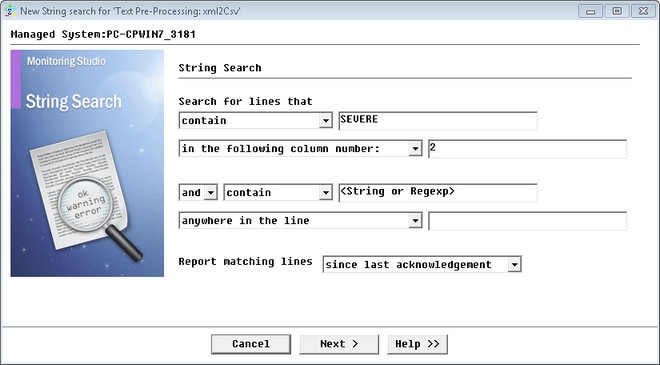
2.Search for lines that contain the string "SEVERE" in the second column, corresponding to XML records whose <LEVEL> is "SEVERE".
From the first pull-down list, select contain and type SEVERE
From the second pull-down list, select in the following column number and type 2 to search in the second column (purple color above)

EX_TextPreProcess_5StringSearch

Performing a String Search Command on a Converted File

3.Click Next
4.Set the automatic acknowledgment of alerts and click Next.
5.Uncheck all the separators and check the semicolon (character previously specified as separator). No other option needs to be modified in our example
6.Click Next.
7.Configure the Monitor settings.
8.Click Finish

NoteYou can create as many String Searches as you want on a file and on a text pre-processing object, and you can create several different text-processing objects on the same file object.

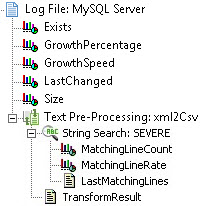
As a result, you get the following String search object: SEVERE under the XML-to-CSV pre-processing object:

EX_TextPreProcess_7StringSearchTreeView

Accessing the String Search Results


Monitoring Studio is now configured to parse your XML log file in order to detect potential severe issues. Go further in the monitoring of your XML log file by configuring Specific Alert Actions.