|
This section details the various connection settings available for performing queries on a ProstgreSQL database server. First steps are common to all database queries and connection methods. They are described in the Analyzing a Database Query chapter.
Configuring a connection to a PostgreSQL server database
| 1. | Define the Connection Settings to the PostgreSQL server database: |
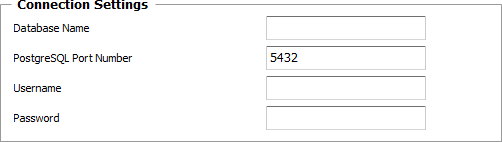
PostgreSQL Server Database - Connection Settings
| ▪ | Database Name: Enter the name of the PostgreSQL database. |
| ▪ | PostgreSQL Port Number: Enter the port that will be used to access the PostgreSQL database. |
| ▪ | Username: Enter the username to use to connect to the database. |
| ▪ | Password: Enter the password associated with the specified username. |
 Connection Settings will be shared by all the queries defined within the PostgreSQL Server Monitor. Connection Settings will be shared by all the queries defined within the PostgreSQL Server Monitor.
| 2. | Define the SQL Query and Timeout properties: |
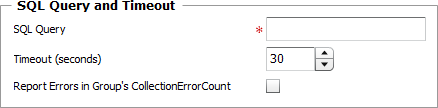
PostgreSQL Server Database - Query and Timeout Settings
| ▪ | SQL Query: Enter the SQL query you wish to perform. |
| ▪ | Timeout (seconds): Specify the time in seconds after which the query will be stopped (Default: 30 seconds). If the query times out, the Status attribute of the Studio Database Query Monitor Type will be set to 2 (Failed) and an alarm will be triggered in TrueSight Operations Management. |
| ▪ | Report Errors in Group's "CollectionErrorCount": Select this option to have the Collection Error Count attribute of the Group Monitor reflect possible alerts triggered upon the query execution. The Collection Error Count attribute of the Group reports on the collection errors of all Monitors, associated to the Group, for which this option is available and selected, providing a global view of the collection errors for the whole Group. |
| 3. | Define the Monitor Settings: |
| ▪ | Internal ID: Enter an ID to identify the managed PostgreSQL query instance in TrueSight Operations Management. |
| ▪ | Display Name: Enter a name to identify the managed PostgreSQL query instance in TrueSight Operations Management. |
| ▪ | Optional — Polling Interval: Set the frequency at which the data collection will be performed. Default is 2 minutes. |
| ▪ | Optional — Alert Actions: Define the action(s) Monitoring Studio needs to perform when the thresholds for this PostgreSQL query instance is breached. |
| 4. | Optional — Define the Content Processing rules you wish to apply to the PostgreSQL query output: |
| ▪ | String Searches: Define the search criteria for a specific string you wish to find or not find in the PostgreSQL query output. |
| ▪ | Numeric Extractions: Define any numeric value to be extracted from the PostgreSQL query output. |
| 5. | Click the Add to List button to complete the creation of the PostgreSQL query instance. |
| 

